
Best Tech Stack for Modern Websites in 2026:
Simple Guide for Beginners & Businesses
Who this guide is for: Business owners deciding what to build on, beginner developers choosing where to start, and technical decision-makers evaluating options for their next project. This guide explains what a tech stack is, why your choice matters, and exactly which stacks are being used for real-world websites in 2026 — with specific recommendations for business websites, eCommerce, SaaS platforms, and custom web applications. No unnecessary jargon — just clear, practical guidance for UK and USA audiences.
- What is a Tech Stack? (Plain English Explanation)
- Why Your Tech Stack Choice Matters More Than You Think
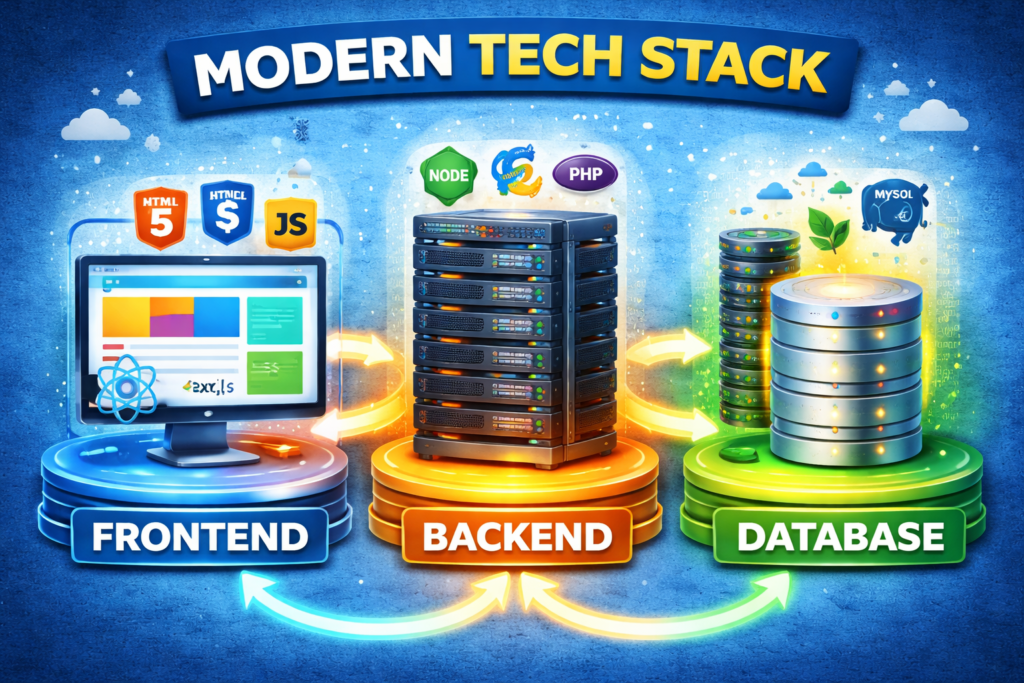
- The Three Layers of Every Website Tech Stack
- Best Tech Stack for Business Websites in 2026
- Best Tech Stack for eCommerce in 2026
- Best Tech Stack for SaaS Platforms in 2026
- Best Tech Stack for Web Applications in 2026
- The WordPress Tech Stack Explained
- React & Next.js — The Modern Frontend Standard
- The MERN Stack — MongoDB, Express, React, Node
- JAMstack — Static, Fast, and Modern
- Choosing the Right Database in 2026
- Hosting & Deployment Platforms in 2026
- Best Tech Stack for Complete Beginners
- Full Stack Comparison Table
- What Tech Stack Does TeamsFreelancer Use?
- Common Tech Stack Mistakes to Avoid
- Frequently Asked Questions
What is a Tech Stack? (Plain English Explanation)
A tech stack is simply the collection of technologies — programming languages, frameworks, databases, and tools — used together to build and run a website or web application. Think of it like the ingredients in a recipe: individually, each technology serves a specific purpose, but it is the combination of them working together that produces the final product.
When a developer says “we built this on the MERN stack” or “this is a Next.js site with a PostgreSQL database on AWS,” they are describing which specific technologies were chosen for each layer of the application. Understanding these choices — even at a high level — helps business owners make better decisions when hiring developers, evaluating project proposals, and planning digital products.
A Simple Analogy
Imagine building a house. You need: structural materials (the foundation and walls — equivalent to the backend/server), interior finishes (how rooms look and feel — equivalent to the frontend/design), plumbing and electrical (how utilities flow — equivalent to the database and APIs), and the land itself (where it all sits — equivalent to hosting). A tech stack is the specific brands and materials chosen for each of these roles in your digital “house.”
Different “houses” need different materials. A small cottage (a simple business website) needs far simpler construction than a hotel (a complex SaaS platform). The right tech stack is the one that matches your specific project’s requirements — not necessarily the newest, most complex, or most impressive-sounding option.
Why Non-Technical Business Owners Need to Understand This
You do not need to be able to write code to benefit from understanding tech stacks. You need to understand them because tech stack decisions made at the start of a project affect: how fast your website loads (affecting both user experience and Google rankings), how easily developers can maintain and extend it over time, how much future development will cost, how well it scales as your business grows, and how dependent you are on specific vendors or technologies. A business owner who understands the basics of tech stacks makes better vendor decisions, asks better questions in development conversations, and avoids being locked into poor technology choices by uninformed decisions.
Key insight: There is no universally “best” tech stack. The right choice depends on your specific project type, your team’s skills, your budget, your performance requirements, and your growth plans. This guide helps you understand which stacks work best for which situations — so you can make informed decisions rather than guessing or deferring entirely to whoever happens to be available.
Why Your Tech Stack Choice Matters More Than You Think
Tech stack decisions are among the most consequential choices made in any digital project — because they are also among the most difficult and expensive to reverse. Building a complex web application on the wrong stack means either living with its limitations indefinitely or paying for a complete rebuild. We have seen UK businesses invest £20,000–£50,000 in a digital product, only to discover that the tech stack chosen by their original developers creates fundamental scaling or maintenance problems that make continuing to build on it economically unviable.
Performance and Google Rankings
Your tech stack directly determines your website’s performance characteristics — loading speed, server response time, and Core Web Vitals scores. Google uses Core Web Vitals (LCP, INP, CLS) as direct ranking signals. A website built on a bloated, poorly chosen stack with unoptimised dependencies will consistently underperform a well-architected site built on a lean, modern stack — regardless of how much content optimisation you apply on top. The foundation matters.
For UK businesses investing in SEO, a tech stack decision that results in a PageSpeed score of 45 instead of 90 is a handicap that no amount of content or link building can fully overcome. Fixing it requires developer time, potential rebuilding of components, and always some risk of breaking existing functionality.
Developer Availability and Cost
Choosing obscure technologies dramatically affects the cost and availability of developers. A website built on PHP with WordPress can be maintained by hundreds of thousands of developers worldwide, including many in the UK at competitive rates. A website built on a niche framework with minimal community adoption creates a scenario where you are dependent on the specific developers who originally built it — with limited alternatives if the relationship ends. Popular, well-supported stacks ensure you are never held hostage by developer availability.
Scalability and Long-Term Cost
A tech stack that works perfectly for 100 users per day may perform catastrophically at 10,000 users per day — if it was not designed with scaling in mind. For businesses with growth ambitions, choosing a stack that scales gracefully — either through architectural design or platform infrastructure — prevents the expensive rebuild that growth otherwise forces.
Maintenance Burden
Every technology in your stack requires maintenance: security updates, compatibility updates as other components evolve, and adaptation to changing browser and infrastructure standards. A stack with many moving parts — particularly if those parts use older or less actively maintained technologies — creates a compounding maintenance burden that grows over time. Modern, well-supported stacks with active communities reduce this burden significantly.
The Three Layers of Every Website Tech Stack
Every website tech stack — from the simplest WordPress blog to the most complex SaaS platform — consists of three fundamental layers. Understanding these layers provides the conceptual framework for evaluating any tech stack discussion clearly.
Layer 1: The Frontend (What Users See and Interact With)
The frontend is everything the user directly experiences — the visual design, the layout, the interactive elements, and the overall feel of the website. Frontend technologies run in the user’s browser and determine how quickly the page appears, how smoothly interactions feel, and how consistently the site renders across different devices and browsers.
The core frontend technologies are: HTML (structure — defines what is on the page), CSS (presentation — defines how it looks), and JavaScript (behaviour — defines how it responds to user interaction). Modern frontend development layers frameworks and libraries on top of these basics: React, Vue, Angular, Svelte, and others that make building complex, interactive frontends more efficient and maintainable.
Layer 2: The Backend (The Logic Behind the Scenes)
The backend is the server-side layer that processes requests, applies business logic, handles authentication, communicates with databases, and sends responses to the frontend. Users never see the backend directly, but it determines what the website can do, how securely it handles data, and how efficiently it processes requests at scale.
Common backend languages and frameworks include: Node.js (JavaScript on the server), PHP (the language powering WordPress and many legacy systems), Python (popular for data-heavy applications and APIs), Ruby on Rails (historically popular, less dominant in 2026), and Java / Kotlin (common in enterprise environments). The backend choice significantly affects performance, scalability, and the pool of available developers.
Layer 3: The Database (Where Data is Stored)
The database stores all the persistent data a website needs: user accounts, content, transactions, settings, and everything else that needs to survive beyond a single session. Database choice affects: how data is structured (relational vs document-based), how fast queries execute at scale, how easily the database handles concurrent users, and how the data can be backed up, migrated, and recovered.
The primary database categories are: SQL (relational) databases like MySQL, PostgreSQL, and MariaDB — structured, ACID-compliant, excellent for complex relational data; and NoSQL (document) databases like MongoDB, Firebase, and Redis — flexible schema, excellent for unstructured data and horizontal scaling. Most modern applications use a combination — a primary relational database supplemented by a cache layer (like Redis) for high-speed data retrieval.
| Stack Layer | Common Options in 2026 | Best For |
|---|---|---|
| Frontend | React, Next.js, Vue, Nuxt, HTML/CSS/JS, Elementor (WordPress) | User interface, interactions, performance |
| Backend | Node.js, PHP (WordPress), Python, .NET, Ruby on Rails | Business logic, APIs, authentication, data processing |
| Database | PostgreSQL, MySQL, MongoDB, Firebase, Redis, SQLite | Data storage, retrieval, relationships |
| Hosting | Vercel, Netlify, AWS, Cloudways, SiteGround, Kinsta | Deployment, scaling, CDN, uptime |
Best Tech Stack for Business Websites in 2026
For most UK and USA business websites — service companies, professional practices, agencies, local businesses, and SMEs — the tech stack decision is considerably simpler than it is for complex applications. The requirements are clear: a professional design that represents the brand well, fast loading times for good Google rankings, easy content management for the business owner or marketing team, and reliable hosting with minimal maintenance burden.
The Recommended Stack: WordPress + Modern Tooling
For standard business websites, WordPress remains the most sensible tech stack choice in 2026 — not out of inertia or unfamiliarity with alternatives, but because it genuinely provides the best combination of capabilities for this use case. The stack we recommend for business websites at TeamsFreelancer is:
- CMS/Platform: WordPress.org (self-hosted)
- Theme: Astra or Kadence (lightweight, performance-optimised base themes)
- Page Builder: Elementor Pro (for visual design without custom development) or custom theme via ACF (Advanced Custom Fields) for more technical projects
- SEO: Yoast SEO or RankMath
- Performance: WP Rocket (caching and optimisation) + Cloudflare CDN
- Hosting: Kinsta, Cloudways, or SiteGround (managed WordPress or cloud hosting with UK servers)
- Email: Google Workspace or Microsoft 365 for professional email
This stack delivers: a PageSpeed score of 90+ when properly configured, complete SEO control through well-supported plugins, easy content management that allows non-technical team members to publish and update content independently, a massive ecosystem of plugins for extending functionality without custom development, and strong long-term developer availability.
When to Consider Next.js Instead
For business websites with specific performance requirements — particularly those with high traffic volumes, complex page logic, or a need for very high PageSpeed scores as a competitive differentiation — Next.js with a headless CMS (like Contentful, Sanity, or headless WordPress) is a compelling alternative. This “headless” approach separates the content management layer from the frontend rendering, enabling the performance characteristics of a static site while retaining the content management convenience of a CMS. The trade-off is higher development cost and greater technical complexity — typically justified at £5,000+ project budgets where performance is a specific business priority.
Our recommendation for UK business websites: WordPress with Astra/Kadence theme + Elementor Pro + WP Rocket + Cloudflare + SiteGround UK hosting. This combination delivers professional quality, excellent performance, easy maintenance, and strong long-term support — at a predictable, affordable cost. It is the stack we use for the majority of TeamsFreelancer’s UK client website projects.
Best Tech Stack for eCommerce in 2026
eCommerce tech stack decisions have more significant consequences than standard business website choices — because eCommerce involves payment processing, inventory management, customer account security, and the direct relationship between performance and revenue. A one-second delay in an eCommerce checkout flow has been shown to reduce conversions by 7%; an eCommerce stack that produces poor mobile performance directly costs revenue every day.
Option 1: Shopify — Best for Most UK eCommerce Businesses
Shopify is a managed eCommerce platform rather than a raw tech stack — it handles hosting, security, payment processing, and core functionality under a single subscription. For businesses selling physical products, Shopify’s combination of reliable infrastructure, comprehensive built-in features, and the largest eCommerce app ecosystem available makes it the most practical choice for most UK small to medium eCommerce businesses in 2026.
Shopify tech stack (what Shopify uses under the hood): Ruby on Rails backend, React frontend components, MySQL database, Cloudflare CDN, and global infrastructure across multiple data centres. You do not need to understand or manage any of this — Shopify handles it entirely — but understanding that Shopify’s infrastructure is genuinely enterprise-grade helps explain why it is trusted by millions of businesses globally.
When Shopify is right: You sell physical products, need reliable checkout and payment processing, want managed hosting without server management complexity, and have a budget of £25–£79/month for the platform plus development costs for custom theme and functionality.
Option 2: WooCommerce (WordPress) — Best for Content-Rich eCommerce
WooCommerce is the leading eCommerce plugin for WordPress, enabling the addition of eCommerce functionality to any WordPress installation. It is the world’s most-used eCommerce platform by install count, though Shopify is increasingly dominant by revenue volume. WooCommerce is the right choice when: your business needs significant content marketing alongside selling (blog, resources, guides), you need granular control over every aspect of your store, you want to avoid platform subscription costs, or your products require complex customisation that Shopify’s model does not accommodate easily.
WooCommerce tech stack: WordPress (PHP/MySQL) base + WooCommerce plugin + payment gateway integrations (Stripe, PayPal, Klarna for UK) + managed WordPress hosting with sufficient resources. Performance optimisation is more critical for WooCommerce than standard WordPress — caching plugin configuration and hosting quality have direct revenue impact.
Option 3: Custom eCommerce (Next.js + Commerce Platform API)
For businesses with complex eCommerce requirements — bespoke product configuration, complex pricing logic, deep ERP integration, or very specific user experience requirements — custom-built eCommerce using Next.js connected to a commerce API (Shopify Storefront API, Commerce.js, or similar) provides maximum flexibility. This “headless commerce” approach is increasingly adopted by UK retailers needing the performance of a custom frontend with the commerce functionality of an established platform. Budget: £10,000–£50,000+ for the initial build; appropriate for businesses with annual eCommerce revenue of £500k+.
| eCommerce Stack | Best For | Monthly Cost | Development Cost |
|---|---|---|---|
| Shopify | Most physical product businesses | £25–£79/month | £800–£5,000 |
| WooCommerce | Content-heavy, custom product, flexibility | £10–£30 (hosting) | £1,000–£6,000 |
| Next.js + Headless Commerce | High-performance, complex, enterprise | Variable (infrastructure) | £10,000–£50,000+ |
Best Tech Stack for SaaS Platforms in 2026
Software as a Service (SaaS) platforms — subscription-based software products serving multiple users through a web interface — require fundamentally different tech stack decisions than marketing or eCommerce websites. The requirements shift dramatically: reliability at scale, real-time functionality, complex authentication and multi-tenancy, billing integration, API design, and performance under concurrent user load all become critical considerations that do not exist for standard websites.
The Modern SaaS Stack in 2026
The dominant SaaS tech stack in 2026 combines React or Next.js for the frontend with Node.js or Python for the backend, PostgreSQL or MongoDB for the database, and cloud infrastructure on AWS, Google Cloud, or Azure for hosting and scaling. This stack is used by the vast majority of successful SaaS companies because each component has proven itself at scale, has abundant developer talent available, and has a mature ecosystem of supporting tools and libraries.
Real-World Example from Our Portfolio
MaxelTracker (maxeltracker.com) — an AI-powered employee monitoring SaaS platform built by TeamsFreelancer — uses React for the frontend, Node.js for the backend API, MongoDB for document-based data storage, WebSockets for real-time monitoring features, Firebase for authentication, and AWS for hosting and scaling. This stack enables real-time data processing across hundreds of concurrent users while maintaining sub-200ms response times — a requirement impossible to meet with a WordPress or traditional PHP stack.
Best Tech Stack for Web Applications in 2026
Web applications — interactive tools, dashboards, booking systems, customer portals, workflow management tools — sit between simple websites and full SaaS platforms. They require more sophisticated frontend interactivity than a marketing site but may not need the multi-tenant infrastructure of a true SaaS product. The right stack for a web application depends primarily on: real-time requirements, expected user volume, complexity of business logic, and integration requirements with external systems.
For Moderate Complexity Web Apps
React or Vue.js frontend with a Node.js (Express) or Django (Python) backend, connected to PostgreSQL, hosted on a managed cloud platform like Railway, Render, or Heroku. This stack is appropriate for: customer portals, booking systems, internal tools, dashboards, and CRMs with moderate user volumes (under 10,000 active users). Development cost: £5,000–£20,000 depending on feature complexity.
For High-Complexity Web Apps
Next.js frontend with a microservices or well-structured monolith backend (Node.js, Go, or Python), PostgreSQL for primary data, Redis for caching and real-time features, and Kubernetes-orchestrated containers on AWS or GCP for hosting. This stack is appropriate for high-traffic applications, complex business logic, extensive third-party integrations, and applications requiring very high reliability and scalability. Development cost: £20,000–£100,000+ depending on scope.
For Simple Internal Tools
Low-code/no-code platforms like Retool, Bubble, or Glide can build useful internal business tools at a fraction of custom development cost — with acceptable performance for internal use cases where custom code’s advantages are less significant. For external-facing applications where brand quality and performance matter, custom development is almost always preferable.
The WordPress Tech Stack Explained
WordPress is not just a platform — it is a complete tech stack. Understanding the technologies that power WordPress helps developers and business owners alike understand its strengths, limitations, and the contexts where it excels.
What WordPress is Built On
Language: PHP — WordPress is built in PHP, a server-side scripting language that has powered the web since 1994. PHP is not the most fashionable technology in 2026, but it is extremely reliable, thoroughly understood, and supported by the largest developer community in the world. Modern PHP (version 8.2+) is significantly faster and more capable than earlier versions — addressing many of the performance criticisms that were valid in earlier years.
Database: MySQL / MariaDB — WordPress stores all content, settings, and user data in a MySQL (or MariaDB, its open-source fork) relational database. MySQL is one of the world’s most reliable and widely used databases — not the most performant option for complex queries at extreme scale, but entirely appropriate for the data patterns of most business websites and even high-traffic content sites.
Frontend: PHP templates + JavaScript — WordPress themes generate HTML from PHP templates on the server, which is served to the browser. The Gutenberg block editor (WordPress’s modern content editing system) adds React components for the editing experience, though the published output remains server-rendered HTML.
Infrastructure: Apache or Nginx web server — WordPress runs on standard web servers; most managed WordPress hosting providers use Nginx for better performance. The server handles incoming requests, passes PHP processing to PHP-FPM, and serves static assets directly.
The Modern WordPress Performance Stack
A properly optimised WordPress installation in 2026 — using modern PHP, a lightweight theme, a caching plugin, and a CDN — performs far better than many developers’ outdated assumptions about WordPress speed. We regularly achieve PageSpeed scores of 95+ for TeamsFreelancer WordPress builds, demonstrating that WordPress’s performance limitations are primarily about implementation quality rather than fundamental architectural constraints.
- PHP 8.2+ hosting — significantly faster than PHP 7.x; confirm your host supports it
- WP Rocket or LiteSpeed Cache — full-page caching dramatically reduces server processing per request
- Cloudflare CDN — serves static assets from global edge locations, reducing latency for all visitors
- WebP images via ShortPixel — automatically converts uploads to WebP format, reducing image file sizes by 25-35%
- Minimal plugin count — under 20 active plugins; each additional plugin increases PHP processing overhead
- Lightweight theme — Astra, Kadence, or GeneratePress vs heavy multipurpose themes
React & Next.js — The Modern Frontend Standard
React is a JavaScript library developed by Facebook (Meta) for building user interfaces. Since its open-source release in 2013, it has become the most widely adopted frontend technology in professional web development — used by companies including Meta, Netflix, Airbnb, Uber, Twitter, and hundreds of thousands of smaller businesses and startups worldwide.
Next.js is a React framework developed by Vercel that adds production-essential features on top of React: server-side rendering, static site generation, API routes, file-based routing, image optimisation, and performance optimisations. In 2026, Next.js is the standard approach for production React applications — used by Vercel, TikTok, Twitch, GitHub, and countless others.
Why React & Next.js Are So Dominant in 2026
- Component-based architecture: React’s component model — breaking UIs into reusable, composable pieces — makes large applications more maintainable and enables code reuse across different parts of an application
- Largest developer ecosystem: More libraries, tutorials, job opportunities, and community resources exist for React than any other frontend framework — meaning developer hiring is easier and solutions to problems are more readily available
- Performance when properly implemented: Next.js with proper use of server-side rendering, static generation, and image optimisation produces some of the highest PageSpeed scores achievable — consistently outperforming WordPress and other CMS-based approaches at the high end of performance optimisation
- TypeScript integration: React and Next.js work seamlessly with TypeScript, enabling type-safe development that catches bugs at compile time rather than runtime — critical for large applications
- Vercel deployment platform: Next.js deployed on Vercel provides a best-in-class developer experience with global edge network deployment, preview deployments for every code change, and automatic performance optimisation
When React/Next.js is the Right Choice
- Interactive applications with complex state management (dashboards, real-time tools, collaborative apps)
- High-performance websites where Core Web Vitals are a competitive priority
- Applications requiring rich, app-like user experiences (drag-and-drop, real-time updates, complex forms)
- SaaS products and web applications where component reuse accelerates development
- Headless CMS frontend implementations where content is managed separately from presentation
When React/Next.js is Overkill
- Simple 5–15 page business websites — WordPress delivers equivalent results at lower cost and complexity
- Basic eCommerce stores — Shopify provides a better all-in-one solution than building custom React eCommerce
- Content-first websites where frequent updates by non-technical teams are required
- Projects with limited budgets where WordPress expertise is more affordable than React developers
The MERN Stack — MongoDB, Express, React, Node
MERN is one of the most popular tech stack acronyms in professional web development — referring to the combination of MongoDB (database), Express.js (backend framework), React (frontend), and Node.js (server runtime). The appeal of MERN is that it enables full-stack JavaScript development — the same language (JavaScript) is used across the entire application, from database queries to server logic to frontend rendering.
The Components of MERN
MongoDB: A NoSQL document database that stores data as JSON-like documents rather than in relational tables. MongoDB’s flexible schema (no rigid table structure required) makes it faster to iterate during development and well-suited for data that does not naturally fit into relational tables — user-generated content, product catalogues with variable attributes, real-time analytics data. MongoDB Atlas (the managed cloud version) provides global distribution, automatic scaling, and built-in backups.
Express.js: A minimal, flexible Node.js web application framework that provides the basic structure for building HTTP APIs. Express handles routing (mapping URLs to handler functions), middleware (processing requests before they reach handlers), and response generation. It is deliberately un-opinionated — providing the minimum necessary structure and leaving architecture decisions to developers, making it flexible but requiring more design decisions than opinionated frameworks like NestJS or Django.
React: As described in the previous section — Meta’s UI component library, the dominant frontend approach in modern web development.
Node.js: A JavaScript runtime built on Chrome’s V8 engine that enables JavaScript to run on the server rather than only in browsers. Node’s event-driven, non-blocking I/O model makes it particularly efficient for applications with many simultaneous connections — chat applications, real-time data streaming, APIs serving many concurrent clients.
MERN Stack Strengths
- Full-stack JavaScript: One language across the entire application enables developer flexibility, code sharing between frontend and backend, and simpler team structures
- JavaScript everywhere: Types, utilities, and validation logic can be shared between frontend and backend, reducing duplication
- Large talent pool: JavaScript developers are the most abundant in the UK and USA job markets, making MERN teams easier to build and maintain
- Real-time capability: Node.js’s non-blocking architecture makes it well-suited for real-time features via WebSockets
- MongoDB flexibility: Schema-less database structure accelerates early development when requirements are changing rapidly
MERN Stack Limitations
- MongoDB’s flexibility is also a risk: Without careful schema design, MongoDB databases can become inconsistent and difficult to query as applications grow
- Node.js CPU limitations: Node’s single-threaded model is excellent for I/O-heavy workloads but less efficient for CPU-intensive processing — Python or Go outperform it for heavy computation
- Express requires significant architecture decisions: The minimal structure of Express means developers must make many more design decisions than with opinionated frameworks, which can lead to inconsistent codebases across large teams
At TeamsFreelancer, we use MERN or its variants (Next.js replacing plain React, NestJS replacing Express for larger projects) for our custom web application projects — including Quantera.ai, Invozio, and the client portal components of several SaaS platform builds.
JAMstack — Static, Fast, and Scalable
JAMstack (JavaScript, APIs, Markup) is an architectural approach rather than a specific set of technologies — it describes building websites where the frontend is pre-rendered as static files (HTML, CSS, JavaScript) at build time rather than dynamically generated on the server for each request. These static files are served from a CDN globally, producing extremely fast load times with essentially zero server infrastructure to manage.
How JAMstack Works
Instead of a server processing PHP and querying a database every time someone visits your website, a JAMstack site runs a build process that pre-generates all pages as static HTML files. When a visitor arrives, they receive a pre-built static file from the nearest CDN node — no server processing, no database queries, no dynamic rendering. The result is typically the fastest possible Time to First Byte (TTFB) and excellent Core Web Vitals scores.
Dynamic functionality — contact forms, user authentication, eCommerce transactions, comments — is handled through external API services rather than server-side code. Stripe handles payments, Netlify Forms handles form submissions, Auth0 handles authentication, and Contentful provides content management. The frontend calls these APIs via JavaScript; the static HTML shell and visual design are always immediately available.
Popular JAMstack Tools in 2026
- Static site generators: Next.js (React), Gatsby (React), Astro, 11ty, Hugo — generate the static HTML files from templates and content
- Headless CMS: Contentful, Sanity, Prismic, DatoCMS, headless WordPress — manage content that is pulled into the site during builds
- Hosting/CDN: Vercel, Netlify, Cloudflare Pages — optimised platforms for deploying and serving JAMstack sites
- API services: Stripe (payments), Auth0 (authentication), SendGrid (email), Algolia (search) — handle dynamic functionality
When JAMstack is the Right Choice
- Content-rich sites where content changes are managed through publishing workflows rather than real-time user interaction
- Marketing websites where performance and Core Web Vitals are primary objectives
- Documentation sites, blogs, and informational resources
- Sites needing global performance with minimal infrastructure management
When JAMstack Has Limitations
- Applications with heavily personalised, user-specific content that cannot be pre-generated
- Real-time applications where data changes faster than build times can accommodate
- Very large content libraries where build times become impractically long (mitigated by Next.js Incremental Static Regeneration)
Choosing the Right Database in 2026
The database choice is one of the most consequential tech stack decisions — because changing databases after significant data has accumulated and application code has been written around the original choice is extremely expensive. Understanding the trade-offs between database options upfront prevents the need for this painful migration.
| Database | Type | Best For | Avoid When |
|---|---|---|---|
| PostgreSQL | SQL / Relational | Complex relational data, financial systems, applications requiring strict data integrity, complex queries | Simple key-value storage, or teams unfamiliar with SQL |
| MySQL / MariaDB | SQL / Relational | WordPress, traditional web applications, well-understood relational data | Complex analytical queries; PostgreSQL is superior for advanced features |
| MongoDB | NoSQL / Document | Flexible schema data, content management, user-generated content, rapid prototyping | Complex relational data with many joins; financial transactions requiring ACID compliance |
| Firebase / Firestore | NoSQL / Document | Real-time applications, mobile backends, rapid MVP development | Large-scale data at low cost (Firebase can be expensive at scale); complex queries |
| Redis | In-memory / Key-value | Caching, session storage, real-time pub/sub, rate limiting — used alongside, not instead of, a primary database | Primary data storage for complex data models |
| SQLite | SQL / Embedded | Development environments, small applications, mobile apps — not appropriate for multi-user web applications | Any multi-user production web application |
The 2026 Database Recommendation for Most Applications
For most SaaS and web applications: PostgreSQL as the primary database + Redis for caching. This combination covers the vast majority of application data requirements with excellent performance, reliability, and ACID compliance — and PostgreSQL’s support in managed cloud services (AWS RDS, Google Cloud SQL, Supabase, Railway) makes it trivial to deploy without server management expertise.
For real-time-heavy applications: MongoDB + Redis. MongoDB’s document model and change streams make real-time data patterns easier to implement than with PostgreSQL; Redis handles pub/sub messaging for instant UI updates.
For WordPress: MySQL or MariaDB — the only option; WordPress does not support other databases natively.
Hosting & Deployment Platforms in 2026
The hosting platform is the final layer of the tech stack — where your application runs and is served to users globally. In 2026, the hosting landscape has consolidated around several excellent managed platforms that dramatically reduce the operational complexity of deploying and scaling web applications.
Best Tech Stack for Complete Beginners
The biggest mistake beginners make when choosing a tech stack is choosing based on what sounds impressive rather than what is genuinely appropriate for their skill level and learning objectives. The best tech stack for a beginner is the one that produces real results fastest — building motivation through visible progress — while establishing transferable skills applicable to professional development later.
Path 1: For Beginners Who Want to Build Websites for Others (Freelancing/Agency)
Start with HTML, CSS, and basic JavaScript — the universal foundation of every frontend technology. Then learn WordPress development: understanding the WordPress template hierarchy, building simple custom themes using PHP and WordPress functions, and configuring plugins effectively. This path produces work you can sell to clients (UK small business websites) within 3–6 months of consistent learning, before advancing to React and modern frameworks.
Learning path: HTML → CSS → JavaScript basics → WordPress (PHP templates) → Elementor/page builders → basic WooCommerce → React (after 6–12 months of freelancing)
Path 2: For Beginners Who Want to Build Applications (SaaS/Start-ups)
Start with HTML, CSS, and JavaScript to build the frontend layer understanding, then move directly to React and Next.js as your component framework. Learn Node.js for backend development, PostgreSQL for databases, and deploy on Vercel and Railway. This path takes 12–18 months to reach professional competency but puts you on the industry-standard stack for application development.
Learning path: HTML/CSS → JavaScript (ES6+) → React → Next.js → Node.js (Express) → PostgreSQL → Git/GitHub → Vercel deployment
The One Mistake to Avoid as a Beginner
Do not spend months studying frameworks in isolation without building real projects. Every technology in this guide is best learned by using it to build something real — a personal website, a portfolio project, a tool that solves a real problem. Tutorial consumption without project building is the most common trap that keeps aspiring developers from reaching professional competency.
Free learning resources: The Odin Project (theodinproject.com) provides a completely free, project-based curriculum covering the full web development stack — highly recommended for beginners targeting the React/Node.js path. For the WordPress path, WordPress.org’s official documentation and free WPBeginner tutorials provide excellent structured learning.
Full Tech Stack Comparison Table
| Tech Stack | Best For | Learning Curve | Performance | Developer Availability UK | Cost (Development) |
|---|---|---|---|---|---|
| WordPress (PHP + MySQL) | Business websites, blogs, content sites | Low | Good (optimised) | Very High | £300–£5,000 |
| Shopify | eCommerce (physical products) | Low | Very Good | High | £500–£5,000 |
| Next.js + Headless CMS | High-performance sites, content-rich apps | Medium-High | Excellent | High | £3,000–£15,000 |
| MERN Stack | Web apps, SaaS, customer portals | High | Very Good | High | £8,000–£40,000 |
| JAMstack (Next.js + APIs) | Static content, marketing, documentation | Medium | Excellent | Medium-High | £3,000–£20,000 |
| WooCommerce | Content-rich eCommerce, custom products | Low-Medium | Good (optimised) | Very High | £800–£6,000 |
| Django (Python) + React | Data-heavy apps, AI/ML integration | High | Very Good | Medium | £10,000–£50,000 |
What Tech Stack Does TeamsFreelancer Use?
We believe in using the right tool for each project — not promoting a single stack regardless of fit. Here is the honest breakdown of what we use and why, across our different project types:
| Project Type | Our Stack | Why We Choose It |
|---|---|---|
| UK Business Websites | WordPress + Astra/Kadence + WP Rocket + Cloudflare | Best performance-to-cost ratio; easiest client self-management |
| High-Performance Sites | Next.js + Contentful/Sanity + Vercel | Maximum Core Web Vitals scores; appropriate for performance-critical projects |
| eCommerce (standard) | Shopify + custom theme + Shopify apps | Best eCommerce infrastructure; reliable checkout; fastest time to market |
| eCommerce (complex/custom) | WooCommerce or Next.js + Shopify Storefront API | Custom requirements that standard Shopify cannot accommodate |
| SaaS Platforms | React + Node.js + MongoDB + AWS | Scalable, real-time capable, full-stack JavaScript team expertise |
| Web Applications | Next.js + Node.js (NestJS) + PostgreSQL + Railway/Vercel | Modern full-stack with excellent TypeScript support and deployment DX |
| Mobile Applications | React Native (iOS + Android cross-platform) | Code sharing between mobile platforms; largest community; works with web React skills |
| AI-powered features | Python (FastAPI) + OpenAI API + Vector databases (Pinecone) | Python’s superiority for ML/AI integration; mature AI SDK ecosystem |
Projects We Have Built on These Stacks
- MaxelTracker.com — React, Node.js, MongoDB, WebSockets, AWS (AI-powered employee monitoring SaaS)
- Quantera.ai — Next.js, Python FastAPI, PostgreSQL, OpenAI integration (AI financial research platform)
- Invozio.com — React, Node.js, MongoDB (invoicing SaaS platform)
- Unikoop.nl — React, Node.js, MongoDB, Firebase (Dutch cooperative eCommerce platform)
- Elliott Homes — Next.js with SSR, headless CMS, Vercel (USA real estate platform)
- Multiple Shopify stores — Custom Liquid themes, Shopify apps, UK payment integrations
- WordPress portfolio — 50+ sites including Gramo Agency, Rank Growth Lab, Big Rig Truck Repair
Common Tech Stack Mistakes That Cost UK Businesses Thousands
Mistake 1: Choosing a stack based on what’s trendy rather than what’s appropriate. Building a simple 10-page business website on a React + GraphQL + headless CMS + serverless functions stack because “that’s what modern developers use” is expensive, creates unnecessary complexity, and provides no meaningful advantage over a well-built WordPress site. The best stack is the simplest stack that meets your actual requirements — not the most impressive-sounding combination available.
Mistake 2: Choosing based on what your first developer knows, not what your project needs. A developer who is excellent at Django but has never worked in WordPress or Node.js will naturally recommend Django — regardless of whether it is the right choice for your project. Always evaluate whether the recommended stack is appropriate for your use case, not just convenient for the proposing developer. Get second opinions on stack decisions for significant projects.
Mistake 3: Ignoring the developer availability implications. Choosing an obscure framework or language because it is technically superior in some dimension creates a serious dependency risk. If your application is built on a technology with few available developers in the UK market, you are vulnerable to being held hostage by specific developers or facing very high maintenance costs when you need to hire. Popular, well-supported technologies — WordPress, React, Node.js, Python — ensure you always have options.
Mistake 4: Under-speccing the database choice for long-term requirements. Starting with SQLite or a simple flat-file solution because it is “good enough for now” creates an expensive migration problem when your application grows. Database migrations are among the most technically risky and time-consuming operations in software development. Choose your database based on your expected requirements in 2–3 years, not just what works today — and default to PostgreSQL when in doubt, as it scales gracefully and handles a wide range of data patterns.
Mistake 5: Not considering the content management workflow. A technically excellent website built on a stack where updating content requires a developer’s involvement — or worse, a code deployment — creates an ongoing operational cost that undermines the business value of the website. Unless you have technical staff available for all content updates, ensure your tech stack includes a content management layer that allows business users to update pages, posts, and other content without technical involvement. This is WordPress’s strongest advantage over many technically superior stacks for most business use cases.
Quick Reference — Tech Stack by Use Case
Not Sure Which Tech Stack is Right for Your Project?
TeamsFreelancer has built production websites and applications on WordPress, Shopify, Next.js, MERN, and custom stacks — for clients across the UK, USA, Netherlands, and Australia. Get a free technical consultation to discuss which stack is genuinely right for your specific project, budget, and goals.
Get Your Free Tech Consultation