WordPress vs Custom Website Development (2026):
Which is Better for Your Business?
Who this guide is for: Business owners, startups, and entrepreneurs across the UK and USA deciding whether to build their website on WordPress or invest in custom development. We compare both options honestly — covering cost, speed, SEO, scalability, security, and long-term value — so you can make the right decision for your specific situation.
- WordPress vs Custom — Quick Overview
- What is WordPress Development?
- What is Custom Website Development?
- Cost Comparison — What Will You Actually Pay?
- Performance & Page Speed
- SEO Capabilities
- Security
- Scalability & Future Growth
- Design Flexibility & Customisation
- Maintenance & Ongoing Costs
- Development Timeline
- When to Choose WordPress
- When to Choose Custom Development
- What UK Businesses Are Choosing in 2026
- Full Side-by-Side Comparison Table
- Frequently Asked Questions
WordPress vs Custom — Quick Overview
Choosing between WordPress and custom website development is one of the most important decisions a business can make when building or rebuilding their online presence. Get it right and your website becomes a powerful growth engine. Get it wrong and you end up with a site that either costs too much, underperforms, or needs a complete rebuild within a few years.
The honest answer is: neither is universally better. The right choice depends entirely on your specific business goals, budget, technical requirements, and long-term plans. A local Swindon restaurant and a UK-based SaaS startup have completely different needs — and the wrong platform for either would be a costly mistake.
In this guide, we break down every meaningful difference between the two approaches so you can make a genuinely informed decision — based on facts and real-world experience, not marketing hype.
Our approach: At TeamsFreelancer, we build both WordPress and fully custom websites for clients across the UK and USA. We recommend the right solution for each client’s needs — not the one that’s most profitable for us. This guide reflects that honest, client-first perspective.
What is WordPress Development?
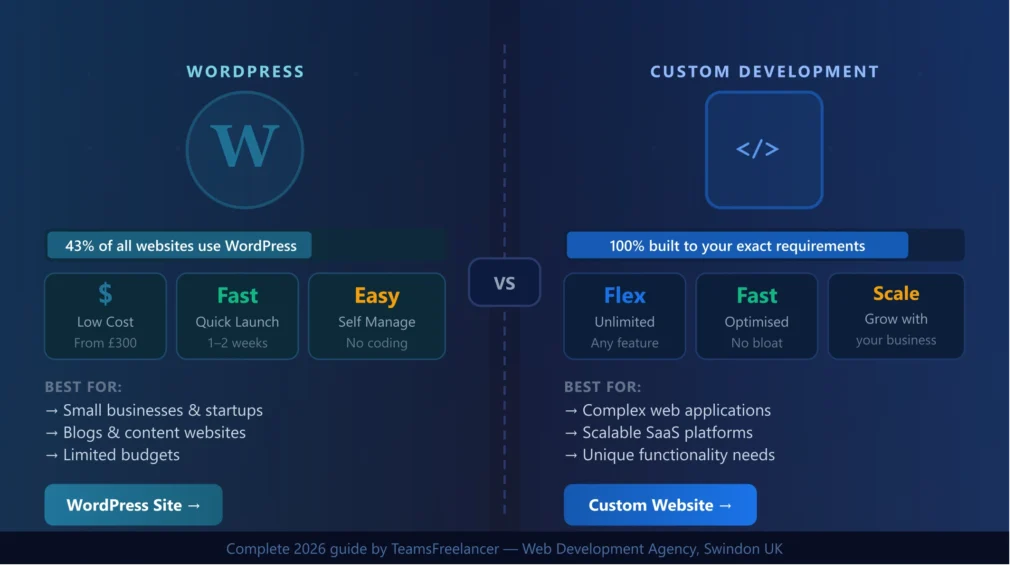
WordPress is an open-source Content Management System (CMS) that was originally created for blogging in 2003 and has since evolved into the world’s most popular website-building platform. As of 2026, WordPress powers approximately 43% of all websites on the internet — from personal blogs to major news outlets to Fortune 500 company websites.
When we talk about “WordPress development,” we typically mean one of two things: using WordPress with an off-the-shelf theme and plugins to build a site quickly and affordably, or using WordPress as the CMS backbone while a developer builds a fully custom theme and bespoke functionality on top of it. The latter is actually closer to custom development, using WordPress purely as a content management layer.
How WordPress Works
WordPress is built on PHP and MySQL. It uses a theme system for the visual design and a plugin system for extending functionality. The WordPress ecosystem includes over 59,000 free plugins in its official directory, covering everything from SEO tools and contact forms to eCommerce functionality and membership systems.
The WordPress admin dashboard allows non-technical users to create and manage content — adding pages, posts, images, and other content without needing to write any code. This self-management capability is one of the platform’s most significant advantages for small and medium-sized businesses.
Types of WordPress Sites
- Theme-based WordPress sites — using a pre-built theme (like Astra, Divi, or OceanWP) with minimal customisation. Fast to build, lowest cost.
- Page builder WordPress sites — using drag-and-drop builders like Elementor or WPBakery to create more customised layouts without custom code.
- Custom WordPress theme — a developer builds a completely unique theme from scratch using WordPress as the CMS. More expensive but fully unique.
- Headless WordPress — WordPress used purely as a backend API, with a separate frontend built in React, Next.js, or similar. This is advanced territory for performance-critical sites.
What is Custom Website Development?
Custom website development means building your website entirely from scratch — using programming languages and frameworks chosen specifically for your project’s requirements, with no pre-built CMS or theme involved. The end result is a website or web application that is 100% unique to your business, built precisely to your specifications.
Custom development typically uses modern technology stacks such as React or Next.js for the frontend, Node.js, Python, or PHP for the backend, and databases like MongoDB, PostgreSQL, or MySQL for data storage. The entire codebase is written specifically for your project — there are no templates, no generic plugins, and no compromise on what the site can or cannot do.
What Custom Development Enables
The fundamental advantage of custom development is the absence of constraints. When you need functionality that no WordPress plugin offers, when your performance requirements exceed what a CMS can deliver, or when your business logic is too complex for a template-based approach — custom development is the answer.
- Complex web applications — customer portals, booking systems, dashboards, marketplaces
- SaaS platforms — subscription-based software products serving multiple users
- API-driven architectures — sites that heavily integrate with third-party services
- Performance-critical platforms — sites requiring sub-second load times at scale
- Unique business logic — workflows and features that don’t exist in any plugin
Real example from our portfolio: MaxelTracker (maxeltracker.com) — an AI-powered employee monitoring SaaS platform we built using React, Node.js, MongoDB, and WebSockets. This level of real-time functionality and custom AI integration would be impossible to achieve on WordPress without essentially rebuilding the platform from scratch anyway.
Cost Comparison — What Will You Actually Pay?
Cost is typically the deciding factor for most UK businesses when choosing between WordPress and custom development. However, it is important to look beyond the initial build cost and consider the total cost of ownership over two to three years — including hosting, maintenance, plugin licences, and any future development work needed.
| Cost Factor | WordPress | Custom Development |
|---|---|---|
| Basic website build | £300 – £2,000 | £1,500 – £10,000+ |
| Monthly hosting | £5 – £50/month | £20 – £200/month |
| Premium theme/plugins | £50 – £500/year | £0 (all included) |
| Maintenance (monthly) | £50 – £200/month | £100 – £400/month |
| Major updates/changes | £100 – £1,000 | £500 – £5,000 |
| 2-year total cost estimate | £1,500 – £8,000 | £5,000 – £25,000+ |
Hidden WordPress costs to watch for: Premium plugins often have annual renewal fees (£50–£300 each). Page builder licences, security plugins, backup solutions, SEO plugins, and performance tools can add £500–£1,500 per year in ongoing plugin costs that many businesses do not anticipate at the start.
For most UK small businesses with a budget of £500–£2,000, WordPress is the only realistic option — and it delivers excellent results at that price point. For businesses with complex requirements or a budget of £5,000+, custom development starts to make financial sense when you factor in the long-term benefits of zero plugin dependencies, better performance, and unlimited scalability.
Performance & Page Speed
Page speed directly affects both your Google rankings (through Core Web Vitals) and your conversion rate. Research consistently shows that a one-second delay in load time reduces conversions by approximately 7% and increases bounce rate by 11%. In a competitive market like the UK, the difference between a website that loads in 1.5 seconds versus one that takes 4 seconds can be the difference between winning and losing a customer.
WordPress Performance
A well-optimised WordPress site can absolutely achieve excellent performance scores. However, by default, WordPress is heavier than custom-built sites because it loads code for all its features — including ones your site does not use. Each additional plugin adds more code that the browser must download, parse, and execute.
With the right optimisation stack — a caching plugin like WP Rocket, a CDN like Cloudflare, WebP image conversion, and a lean, well-coded theme — WordPress sites can score 90+ on Google PageSpeed Insights. The key is disciplined development and ongoing maintenance to prevent plugin bloat from accumulating over time.
Custom Development Performance
Custom-built websites have an inherent performance advantage because they contain only the code that is actually needed. There is no CMS overhead, no unused plugin code, and no generic theme functions running in the background. Every function serves a specific purpose. This typically results in faster initial load times, better Core Web Vitals scores, and lower server resource usage — particularly important for high-traffic websites.
The verdict on speed: Custom development wins on raw performance, but a properly optimised WordPress site can come extremely close. The gap matters most for high-traffic sites and complex applications. For a typical UK business website, optimised WordPress delivers perfectly acceptable performance.
SEO Capabilities
Both WordPress and custom-built websites can rank on page 1 of Google. SEO success is determined far more by content quality, backlinks, and technical execution than by which platform a site is built on. However, each approach has different SEO characteristics worth understanding.
WordPress SEO
WordPress has excellent SEO capabilities, particularly when paired with plugins like Yoast SEO or RankMath. These plugins make it straightforward for non-technical users to set meta titles and descriptions, generate XML sitemaps, add schema markup, manage canonical tags, and monitor basic SEO health. For most small and medium UK businesses, WordPress provides everything needed to rank well on Google.
WordPress also makes content publishing extremely easy — a major SEO advantage since Google rewards regularly updated websites with fresh, relevant content. The ability to publish a new blog post or service page without developer involvement means you can execute a content strategy independently, which is one of the most powerful long-term SEO advantages.
Custom Development SEO
Custom-built websites require a developer to manually implement SEO features that WordPress plugins handle automatically. This means more upfront development time and cost, but the result is typically cleaner code, faster page load times, and more precise control over every SEO element. Custom development is also necessary for advanced SEO scenarios such as complex schema markup, JavaScript-rendered content optimisation, and multi-language hreflang implementations.
One area where custom development has a clear advantage is Core Web Vitals. Since custom sites have no CMS overhead or plugin bloat, they almost always outperform WordPress sites on LCP, INP, and CLS metrics — and Google’s page experience signals directly affect rankings.
SEO verdict: WordPress is the better SEO choice for most UK businesses purely because it makes content creation so much easier. The best SEO strategy is consistent, high-quality content — and WordPress makes this accessible to non-technical business owners. Custom development wins on technical SEO performance metrics.
Security
Security is often cited as a weakness of WordPress, and this reputation has some basis in fact — but it is also frequently overstated. Understanding the real security situation for both platforms helps you make an informed decision and take appropriate precautions regardless of which you choose.
WordPress Security Realities
WordPress’s popularity makes it a target. Because 43% of all websites run WordPress, hackers invest time in finding vulnerabilities in the platform and its most popular plugins. The most common WordPress security issues stem from outdated plugins and themes rather than the WordPress core itself. WPScan reports that approximately 97% of WordPress vulnerabilities come from plugins and themes, not the core platform.
A WordPress site maintained with regular updates, security scanning, a reputable hosting environment, and security plugins like Wordfence or Sucuri can be extremely secure. The problem is that many WordPress sites are neglected — plugins go unupdated for months or years, creating exploitable vulnerabilities.
Custom Development Security
Custom-built websites are inherently less of a target because attackers cannot use automated tools that exploit known WordPress plugin vulnerabilities. However, custom code introduces its own security considerations — SQL injection, cross-site scripting (XSS), and authentication flaws are all potential issues in poorly written custom code. Security in custom development is only as strong as the developer who wrote it.
The #1 WordPress security mistake: Installing cheap or nulled (pirated) themes and plugins from unofficial sources. These frequently contain malware backdoors that give attackers persistent access to your site. Always use legitimate, regularly updated plugins from reputable developers or the official WordPress repository.
Scalability & Future Growth
Scalability refers to how well your website handles growth — both in terms of traffic volume and in terms of added features and complexity. This is one of the most important long-term considerations, and it is where the difference between WordPress and custom development becomes most significant.
WordPress Scalability
WordPress can scale reasonably well for content-heavy websites with significant traffic — sites like TechCrunch, BBC America, and the New York Times have run on WordPress. However, WordPress struggles with scalability when you start adding complex custom functionality. Each additional plugin adds complexity, potential conflicts, and performance overhead. At a certain point, a heavily customised WordPress site becomes harder to maintain and less performant than a purpose-built custom solution would be.
For a UK business website that primarily serves content — service pages, blog posts, a contact form, and basic lead generation — WordPress scales perfectly well to hundreds of thousands of visitors per month with appropriate hosting. For applications requiring complex real-time functionality, multi-tenant architecture, or deep third-party integrations, WordPress’s limitations become apparent.
Custom Development Scalability
Custom development is designed for scalability from the ground up. When built correctly, a custom web application can handle millions of users, support complex microservices architectures, and be extended in virtually any direction without the constraints of a CMS framework. The investment is higher upfront, but the absence of platform constraints means the application can grow as far as your business takes it without a costly rebuild.
Design Flexibility & Customisation
Design flexibility is another area where the two approaches diverge significantly. Understanding the real limits of each platform helps you avoid the frustration of choosing a solution that cannot deliver the visual or functional outcome you need.
WordPress Design Flexibility
Modern WordPress with page builders like Elementor gives non-technical users significant design control — and a skilled WordPress developer can build genuinely beautiful, highly customised websites. However, there are real constraints. Even with a custom WordPress theme, you are still working within WordPress’s template hierarchy and PHP-based rendering system. Certain animations, interactions, and layouts that are straightforward in a modern JavaScript framework become complex workarounds in WordPress.
Additionally, if you use a popular page builder, your design becomes somewhat dependent on that plugin continuing to be maintained. Switching page builders typically means rebuilding your entire site’s layouts from scratch — a hidden long-term constraint many businesses discover too late.
Custom Development Design Freedom
Custom development has zero design constraints. If you can imagine it and your developer can build it, it can exist. Complex animations using GSAP, interactive data visualisations with D3.js, real-time updates with WebSockets, fully custom user experiences — all of these are straightforward in custom development and range from difficult to impossible in WordPress.
Maintenance & Ongoing Costs
The ongoing cost of maintaining a website is frequently underestimated when businesses initially decide between WordPress and custom development. Over a three-to-five year period, ongoing maintenance costs can equal or exceed the initial development cost — making this an important factor in the true cost comparison.
WordPress Maintenance
WordPress requires regular maintenance to stay secure and performing well. This includes updating the WordPress core, updating plugins and themes, running security scans, backing up the database and files, monitoring performance, and resolving plugin conflicts when updates cause compatibility issues. Conflicts between plugins after updates are a common headache for WordPress site owners — and can temporarily break features or even take a site offline.
Many UK businesses pay a web agency or developer £100–£200 per month for WordPress maintenance. Alternatively, some business owners manage it themselves, but this requires time and technical confidence that not everyone has. Neglecting maintenance is the most common cause of WordPress sites being hacked.
Custom Development Maintenance
Custom-built websites generally require less frequent maintenance than WordPress sites in terms of security patches and update conflicts. However, when updates are needed — such as upgrading Node.js versions, updating npm packages, or adapting to browser or API changes — they require a developer’s involvement. There is no drag-and-drop update button like WordPress provides.
Custom sites also require developer involvement for any content updates that are not covered by an integrated admin interface — which can increase ongoing costs if the site was not built with a suitable content management layer.
Development Timeline
How quickly you need your website live is a practical consideration that often influences platform choice — particularly for startups or businesses launching a new product or service on a deadline.
| Website Type | WordPress Timeline | Custom Development Timeline |
|---|---|---|
| Simple 5-page business website | 1–2 weeks | 3–6 weeks |
| 10–20 page website with blog | 2–4 weeks | 6–10 weeks |
| eCommerce (WooCommerce/Shopify) | 2–6 weeks | 8–16 weeks |
| Web application / SaaS platform | 4–12 weeks (limited) | 10–24 weeks |
| Enterprise website | 6–12 weeks | 16–26 weeks |
Speed to market tip: If you need a professional website live within 2–3 weeks for a product launch, event, or business opening — WordPress is almost always the right choice. Custom development timelines are longer because the entire codebase is being built from scratch with no pre-existing components to leverage.
When to Choose WordPress
WordPress is the right choice for a large majority of UK businesses. Here are the specific situations where we at TeamsFreelancer recommend WordPress as the better option:
- You have a budget under £3,000 — WordPress delivers professional, high-quality results at this price point; custom development at this budget would result in a very basic site
- You need a content-heavy website — blogs, news sites, portfolio sites, and service websites all work beautifully on WordPress
- You want to manage content yourself — WordPress’s admin dashboard is designed for non-technical users and makes updating your own content straightforward
- You need to be live quickly — a professional WordPress website can be built, tested, and launched in 1–4 weeks
- You are a local UK business targeting local customers — a well-built, SEO-optimised WordPress site is all you need to compete for local search terms in Swindon, Bristol, London, or anywhere in the UK
- You need a standard eCommerce store — WooCommerce on WordPress handles most eCommerce requirements for small to medium businesses excellently
- Your functionality needs are standard — contact forms, galleries, booking plugins, SEO tools, and thousands of other common features are available as well-maintained plugins
When to Choose Custom Development
Custom development is justified — and often essential — in the following situations:
- You are building a SaaS product — subscription-based platforms with multiple user types, complex billing, and bespoke application logic require custom development
- You need functionality no plugin provides — if your core business logic or user experience cannot be replicated with existing WordPress plugins, custom is the answer
- You have serious performance requirements — applications that need to serve thousands of concurrent users, handle real-time data, or load near-instantly at scale need custom architecture
- Security is paramount — financial services, healthcare, and legal platforms handling sensitive data often require the reduced attack surface that custom development provides
- You have complex third-party integrations — deeply integrated systems connecting CRMs, ERPs, payment processors, and external APIs typically benefit from a custom-built integration layer
- Your budget is £5,000+ — at this investment level, the long-term benefits of custom development begin to outweigh the higher upfront cost
- Long-term scalability is critical — if you plan to grow aggressively or eventually seek investment, a custom-built platform is a more credible and scalable foundation
What UK Businesses Are Choosing in 2026
Based on our experience building websites for clients across Swindon, the South West, London, and beyond, here is what we are seeing in the UK market in 2026:
Small businesses and sole traders (annual revenue under £500k) overwhelmingly choose WordPress. The combination of affordable build costs, easy self-management, and the availability of quality themes and plugins makes it the practical and sensible choice for this segment.
Growing SMEs (revenue £500k–£5m) are split. Those primarily using their website as a marketing and lead generation tool tend to stick with WordPress — particularly when they have an in-house team comfortable managing content. Those with more complex digital products, customer portals, or integration requirements are increasingly moving toward custom solutions or a hybrid approach (custom frontend with headless WordPress as a CMS backend).
Startups and tech companies building digital products almost universally choose custom development. The flexibility, performance, and scalability that custom development offers are non-negotiable for companies building applications rather than brochure websites.
Our recommendation for most UK businesses: Start with WordPress. It provides everything 80% of businesses need at a fraction of the cost of custom development. If and when your requirements outgrow what WordPress can deliver, a custom rebuild based on your real-world needs and user data will be far more targeted and effective than speculative custom development upfront.
Full Side-by-Side Comparison Table
| Factor | WordPress | Custom Development | Winner |
|---|---|---|---|
| Initial cost | £300 – £5,000 | £1,500 – £25,000+ | WordPress |
| Build time | 1–6 weeks | 4–24 weeks | WordPress |
| Design flexibility | Good (with limits) | Unlimited | Custom |
| Performance (optimised) | 85–95 score | 95–100 score | Custom |
| SEO capability | Excellent (with plugins) | Excellent (manual) | Tie |
| Content management | Very easy (built-in) | Depends on build | WordPress |
| Security | Good (when maintained) | Good (when built well) | Tie |
| Scalability | Moderate | Unlimited | Custom |
| Maintenance effort | Regular updates needed | Less frequent, dev needed | Tie |
| Plugin/extension ecosystem | 59,000+ plugins | Build everything bespoke | WordPress |
| Ongoing cost | £100–£400/month | £200–£600/month | WordPress |
| Best for complex apps | Limited | Ideal | Custom |
| Long-term flexibility | Moderate | Unlimited | Custom |
Not Sure Which is Right for You?
Get a free consultation with the TeamsFreelancer team. We’ll assess your requirements and recommend the right approach — honestly. We serve businesses across Swindon, the UK, and the USA.
Get Your Free Consultation Today