
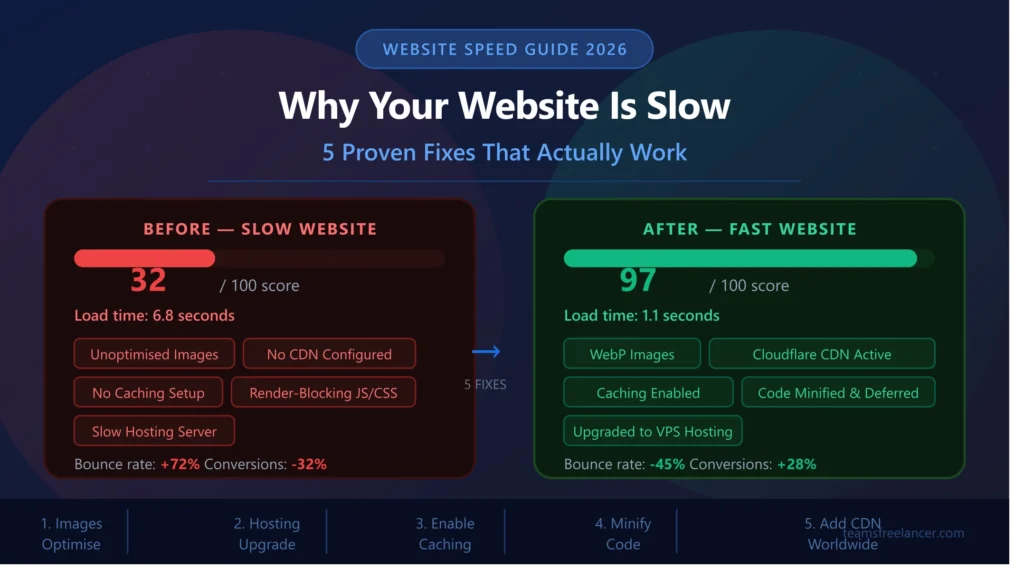
Why Your Website is Slow — 5 Proven Fixes That Work
in the UK, USA & Worldwide (2026)
Who this guide is for: Business owners, website managers, and developers in the UK, USA, and worldwide who want to diagnose why their website is slow and fix it — permanently. Whether your site is built on WordPress, Shopify, a custom framework, or anything else, every fix in this guide applies universally. No fluff, no vague advice — just specific, actionable solutions that work.
- Why Website Speed Matters More Than Ever in 2026
- How to Diagnose Your Website Speed Problems
- Cause 1: Unoptimised Images
- Cause 2: Slow or Shared Hosting
- Cause 3: No Caching Configured
- Cause 4: Render-Blocking JavaScript & CSS
- Cause 5: No Content Delivery Network (CDN)
- Fix 1: Optimise Your Images
- Fix 2: Upgrade Your Hosting
- Fix 3: Enable Caching
- Fix 4: Minify & Defer Code
- Fix 5: Set Up a CDN
- Core Web Vitals — The Google Speed Standard
- Mobile Speed Optimisation
- WordPress-Specific Speed Fixes
- Advanced Speed Fixes
- Best Tools to Test Website Speed
- Frequently Asked Questions
Why Website Speed Matters More Than Ever in 2026
Website speed has never been more critical than it is in 2026. Visitors’ expectations have increased dramatically over the past decade — what was considered an acceptable 5-second load time in 2015 is now considered broken. Research consistently shows that modern web users expect pages to load in under 2 seconds, and the majority will abandon a site that takes 3 or more seconds without a second thought.
But speed is not just about user patience. In 2026, it directly affects three of the most important metrics for any business website: Google rankings, conversion rate, and revenue.
Website Speed & Google Rankings
Google has used page speed as a ranking signal since 2010, but its importance has grown significantly since the introduction of Core Web Vitals as an official ranking factor. Core Web Vitals — which measure Largest Contentful Paint (LCP), Interaction to Next Paint (INP), and Cumulative Layout Shift (CLS) — are now direct ranking signals. A website that fails these metrics is actively penalised in search rankings compared to faster competitors with similar content.
For businesses in the UK and USA targeting competitive search terms — from “IT companies Swindon” to “web development agency London” to “SaaS platform USA” — a slow website is quietly handing rankings to faster competitors every single day. The content may be better, the design may be more appealing, but if the technical performance is worse, Google will rank the faster site above yours.
Website Speed & Conversions
The conversion impact of website speed is well-documented and consistent across industries. A one-second delay in page load time reduces conversions by approximately 7%, according to research by Akamai. Walmart found that for every one-second improvement in page load time, conversions increased by 2%. COOK — a UK-based meal delivery company — increased conversions by 7% simply by reducing page load time by 0.85 seconds.
For an e-commerce site turning over £500,000 per year, a 7% conversion improvement from a one-second speed improvement equals £35,000 in additional annual revenue — from a technical change that might cost £500–£1,000 to implement. The return on investment for website speed optimisation is among the highest of any digital marketing activity.
The speed expectation by market: UK and USA users have particularly high expectations for web performance — both markets have excellent broadband and 5G infrastructure, meaning users have no patience for slow sites. A website that might be tolerable in a market with slower average internet speeds will frustrate and lose UK and USA visitors far more quickly.
How to Diagnose Your Website Speed Problems
Before you can fix a slow website, you need to understand precisely what is causing it. Guessing at the problem and applying random fixes is inefficient and often ineffective. The right approach is to measure first, then fix what the data tells you is the bottleneck.
Start by testing your website with the three most important speed testing tools — each measures slightly different things and together give you a complete picture:
Step 1 — Run a Google PageSpeed Insights Test
Visit pagespeed.web.dev and enter your website URL. Google PageSpeed Insights tests your page against real-world Chrome user data and gives you a performance score out of 100, along with your actual Core Web Vitals metrics. It then provides specific, prioritised recommendations for improvement — organised by the estimated impact each fix will have on your score. This is the most important test because it reflects exactly what Google measures when determining how to rank your page.
Step 2 — Run a GTmetrix Test
GTmetrix provides a detailed waterfall chart showing every resource your page loads — images, scripts, stylesheets, fonts — in the order they load, along with how long each one takes. This waterfall view is essential for identifying which specific resources are causing delays. You can also test from different server locations (including London and New York) to see how your site performs for UK and USA visitors specifically.
Step 3 — Use Our Free Website Speed Checker
Use the TeamsFreelancer Website Speed Checker for a quick, accessible overview of your site’s performance. It provides an instant summary of your key metrics and flags the most critical issues to address first.
Important: Always test the same page — ideally your homepage and your most important service or product page — rather than just any random URL. And test multiple times; speed scores can vary between tests depending on server load at the time of testing. Take an average of 3 tests for the most accurate reading.
Understanding Your Speed Score
| Score Range | Rating | Action Needed |
|---|---|---|
| 90 – 100 | Good | Minor optimisations only — focus on content and conversions |
| 50 – 89 | Needs improvement | Several issues to address — prioritise by estimated impact |
| 0 – 49 | Poor | Significant performance issues — fix immediately; ranking penalty likely |
Cause 1: Unoptimised Images
Images are consistently the single largest contributor to slow page load times. On average, images account for 50–60% of the total page weight on most websites. When images are uploaded without optimisation — using the wrong format, at the wrong resolution, or without compression — they can add seconds to your load time on their own.
The most common image-related speed mistakes are: uploading original camera photos at full resolution (often 4,000–6,000 pixels wide) when they will be displayed at 800 pixels, using outdated file formats like BMP or PNG for photographs, failing to compress images before upload, and not implementing lazy loading so all images load simultaneously rather than as needed.
How to Identify Image Problems
In Google PageSpeed Insights, look for recommendations titled “Serve images in next-gen formats,” “Properly size images,” and “Defer offscreen images.” In GTmetrix’s waterfall chart, look for any image files larger than 100KB — on a typical webpage, most images should be under 50–80KB after proper optimisation.
Most common mistake: Uploading a 4MB JPEG directly from a smartphone or camera to your website without any resizing or compression. A single image like this takes longer to download than an entire well-optimised webpage. We regularly see UK business websites with hero images exceeding 5–10MB — causing load times of 8–12 seconds on mobile connections.
Cause 2: Slow or Shared Hosting
Your web hosting is the foundation of your website’s performance. No matter how well-optimised your images and code are, a slow or overloaded hosting server puts a ceiling on how fast your site can ever be. Server response time — measured as Time to First Byte (TTFB) — is the time from when a browser requests your page to when it receives the first byte of data. Google recommends a TTFB of under 800ms. Many cheap shared hosting providers regularly exceed 2,000–3,000ms.
Shared hosting — where your website shares server resources with hundreds or thousands of other websites — is the most common culprit. When other sites on your shared server experience traffic spikes, your site’s performance degrades too. This is completely outside your control as long as you remain on shared hosting.
Server location is also significant. If your hosting server is in the USA but most of your visitors are in the UK, every page request has to travel thousands of miles across the Atlantic and back. This physical distance adds latency that no amount of code optimisation can fully overcome. UK businesses should use UK or European servers; USA businesses should use USA-based servers.
Signs your hosting is the bottleneck: If your PageSpeed score is poor but Google’s recommendations focus on server response time rather than image or code issues, or if your TTFB exceeds 1,500ms in GTmetrix’s waterfall chart, your hosting is the primary problem — and no frontend optimisation will solve it.
Cause 3: No Caching Configured
Every time a visitor loads your website without caching, the server has to build the page from scratch — querying the database, processing PHP (for WordPress sites), assembling HTML, and sending it all to the browser. This process can take hundreds of milliseconds to several seconds depending on your hosting environment and page complexity.
Caching eliminates most of this work for repeat visitors and, with server-side caching, even for first-time visitors. When a page is cached, the server stores a pre-built version that can be delivered almost instantly without rebuilding it from scratch every time. The result can be a 50–80% reduction in server response time for cached pages.
There are three types of caching relevant to most websites:
- Browser caching — stores static files (images, CSS, JavaScript, fonts) locally in the visitor’s browser, so repeat visits load these files from their device rather than re-downloading them from your server.
- Server-side / page caching — stores fully rendered HTML pages on the server so they can be delivered without re-processing PHP and database queries on each request.
- Object caching — stores the results of database queries in memory (using tools like Redis or Memcached) so complex queries do not need to be run repeatedly.
Cause 4: Render-Blocking JavaScript & CSS
When a browser loads a web page, it reads the HTML from top to bottom. When it encounters a JavaScript file or CSS file linked in the HTML, it stops rendering the page until that file has been fully downloaded and processed — unless explicitly told otherwise. These are called render-blocking resources, and they are one of the most significant causes of slow-feeling websites even when the underlying page is not particularly large.
A common scenario: a WordPress site has 15 plugins, each loading its own JavaScript file in the page header. The browser must download and process all 15 files before it can show anything to the visitor. Even if each file is small, the sequential downloading adds up — and on mobile connections, this can add 2–4 seconds to perceived load time before the visitor sees a single pixel of content.
The solution involves two techniques: minification (removing unnecessary characters from code files to reduce their size) and deferring or asynchronously loading non-critical scripts so they do not block page rendering. CSS critical path optimisation — inlining the minimal CSS needed to display the above-the-fold content and loading the rest asynchronously — is the advanced version of this fix.
Quick way to spot this: In Google PageSpeed Insights, look for recommendations titled “Eliminate render-blocking resources” and “Minify CSS” or “Minify JavaScript.” The estimated savings in seconds are shown next to each recommendation — this tells you exactly how much time you would gain by fixing each issue.
Cause 5: No Content Delivery Network (CDN)
A Content Delivery Network (CDN) is a global network of servers that stores cached copies of your website’s static assets — images, CSS, JavaScript, fonts, videos — in data centres located around the world. When a visitor requests your website, the CDN serves these files from the server geographically closest to them, rather than from your origin server which may be thousands of miles away.
The impact of a CDN on international websites is substantial. Without a CDN, a visitor in New York loading a website hosted on a UK server must wait for data to travel approximately 5,500km each way — a round trip that adds latency impossible to eliminate through any other means. With a CDN, that same visitor is served by a New York-based CDN node, reducing latency by 60–80% for static assets.
For UK businesses targeting both domestic UK visitors and international customers in the USA, Australia, Canada, or elsewhere — a CDN is not optional, it is essential. Without one, your international visitors will consistently experience a slower version of your website than UK visitors, increasing their bounce rate and reducing their likelihood of converting.
Fix 1: Optimise Your Images — The Highest-Impact Quick Win
Image optimisation is typically the fastest way to improve your website speed because the impact is immediate and significant, and the process can be largely automated once set up correctly. Here is a systematic approach to getting every image on your website properly optimised:
Step 1 — Convert to WebP Format
WebP is Google’s modern image format designed specifically for the web. WebP files are 25–34% smaller than JPEG files and 26% smaller than PNG files at comparable visual quality. All major browsers — Chrome, Firefox, Safari, Edge — have supported WebP since 2020, making it safe to use universally.
On WordPress, plugins like ShortPixel, Smush, or Imagify automatically convert uploaded images to WebP and serve the WebP version to supported browsers, falling back to JPEG/PNG for older browsers. For static websites, tools like Squoosh.app allow manual conversion. On Shopify, use a CDN-based image transformation app to serve WebP automatically.
Step 2 — Resize Images to Display Dimensions
Never upload an image larger than it will be displayed. If your blog post content area is 800 pixels wide, your images should be 800 pixels wide — not 4,000 pixels (which is what most smartphones and cameras produce). A 4,000-pixel image displayed at 800 pixels is downloading 25 times more data than necessary. At typical JPEG compression, this difference can be the difference between a 50KB image and a 2MB image.
As a general guide: hero images should be no wider than 1,600 pixels, blog post images no wider than 1,200 pixels, and thumbnail images no wider than 600 pixels.
Step 3 — Compress Images Before Upload
Even correctly sized images can be compressed further without visible quality loss. Tools like TinyPNG, Squoosh, or ShortPixel can typically reduce JPEG and PNG file sizes by 40–70% with no visible degradation. For a typical webpage with 10 images, this alone can reduce total page weight by several megabytes.
Step 4 — Implement Lazy Loading
Lazy loading tells the browser not to load images until they are about to enter the visitor’s viewport as they scroll down the page. This means only the images visible on the initial screen are loaded immediately, while images further down the page are deferred. The result is dramatically faster initial page load times — particularly important for long pages with many images.
On WordPress, lazy loading is enabled by default since WordPress 5.5. For custom-built sites, add loading="lazy" to your image tags. For background images in CSS, JavaScript-based lazy loading libraries like Lozad.js handle this elegantly.
- Convert all images to WebP format — use ShortPixel, Smush, or Imagify on WordPress; manual conversion via Squoosh for other platforms
- Resize images to maximum display size — hero: max 1600px, content images: max 1200px, thumbnails: max 600px
- Compress images before upload — target under 100KB for most images; under 200KB for hero images
- Enable lazy loading — add loading=”lazy” attribute to all images below the fold
- Specify width and height on all images — prevents CLS (layout shift) by reserving space before images load
- Use descriptive alt text — both for accessibility and SEO; alt text helps Google understand image content
Fix 2: Upgrade Your Hosting
If your Time to First Byte (TTFB) consistently exceeds 800ms — or if your website is on shared hosting and you have done everything else on this list without significant improvement — it is time to upgrade your hosting. This is the single change that has the most dramatic impact on server response time, and unlike other optimisations, it requires no ongoing technical maintenance once configured.
Hosting Types: From Slowest to Fastest
| Hosting Type | Typical TTFB | Best For | Monthly Cost |
|---|---|---|---|
| Shared Hosting | 1,500–5,000ms | Personal sites, very small traffic | £2–£10/month |
| VPS (Virtual Private Server) | 200–600ms | Small-medium businesses | £15–£80/month |
| Managed WordPress Hosting | 100–400ms | WordPress sites of all sizes | £20–£100/month |
| Dedicated Server | 50–200ms | High-traffic sites, enterprise | £100–£500/month |
| Cloud Hosting (AWS/Vercel) | 50–300ms | Scalable custom applications | Variable / usage-based |
Recommended Hosting for UK Businesses
For most UK small to medium businesses running WordPress, managed WordPress hosting from providers like Kinsta, WP Engine, or Cloudways provides the best balance of performance, reliability, and ease of management. These providers include server-side caching, UK or European server locations, automatic updates, and security monitoring — all of which contribute to both better performance and lower maintenance burden.
For custom-built applications, cloud hosting on AWS (Amazon Web Services) with a UK region server, or deployment on Vercel for Next.js applications, provides excellent performance with global edge network delivery included.
Real impact: We have migrated multiple UK clients from shared hosting to VPS or managed WordPress hosting, and the before/after results are consistently dramatic. A typical migration reduces TTFB from 2,000–4,000ms to 150–300ms — a 10-15x improvement in server response time that immediately shows up in Google PageSpeed scores and real user experience.
Fix 3: Enable Caching
Caching is one of the highest-impact, lowest-effort speed improvements available for most websites. Once properly configured, it runs automatically in the background — delivering pre-built pages to visitors in milliseconds rather than the hundreds of milliseconds required to dynamically build them on each request.
How to Enable Caching on WordPress
On WordPress, caching is implemented through plugins. The most reliable and well-maintained options in 2026 are:
- WP Rocket (paid, ~£45/year) — the gold standard for WordPress caching. Handles page caching, browser caching, database optimisation, preloading, and code minification in a single plugin. Minimal configuration required to achieve excellent results.
- W3 Total Cache (free) — more complex to configure than WP Rocket but powerful when set up correctly. Suitable for technically confident users who want granular control.
- LiteSpeed Cache (free) — excellent performance particularly on LiteSpeed hosting servers. Includes image optimisation, CDN integration, and advanced caching controls.
How to Enable Caching on Custom Websites
For custom-built websites on Node.js or other frameworks, caching is typically implemented at the application level using tools like Redis or Memcached for data caching, and at the CDN/reverse proxy level using Nginx, Cloudflare, or Varnish for full-page caching. For Next.js applications, incremental static regeneration (ISR) provides efficient page-level caching out of the box.
Browser Caching Configuration
Browser caching tells visitors’ browsers to store static files locally rather than re-downloading them on every visit. This is configured through HTTP headers (specifically Cache-Control and Expires headers) on your web server. For WordPress on Apache hosting, adding caching rules to your .htaccess file is straightforward. For Nginx servers, these headers are set in the server configuration file.
- Install a caching plugin — WP Rocket (paid) or LiteSpeed Cache (free) for WordPress
- Enable page caching — ensures dynamically built pages are cached and served as static HTML
- Configure browser caching — set long cache lifetimes (1 year) for static assets like images, CSS, and JS
- Enable database caching — reduces repeated database queries on dynamic pages
- Set up cache preloading — pre-builds cache after updates so the first visitor after a change does not experience a slow uncached load
Fix 4: Minify & Defer Your Code
Every CSS, JavaScript, and HTML file your website loads contributes to page weight and load time. Minification removes all the unnecessary characters from these files — whitespace, comments, line breaks, long variable names — without changing their functionality. A typical CSS file might be reduced by 20–40% through minification alone, while JavaScript files often see even greater reductions.
Beyond size reduction, deferring non-critical JavaScript prevents it from blocking the browser’s page rendering. When JavaScript is in the <head> of your HTML without a defer or async attribute, the browser stops rendering the page completely until it has downloaded and executed that script. For a page with multiple scripts, this creates a queue of render-blocking resources that can add multiple seconds to the time before a visitor sees any content.
How to Minify Code
On WordPress, code minification is handled by the same caching plugins mentioned above — WP Rocket, LiteSpeed Cache, and W3 Total Cache all include built-in minification. Enable CSS minification and JavaScript minification in your plugin settings. Be cautious with JavaScript combining (merging multiple JS files into one), as this can sometimes cause plugin conflicts — test thoroughly after enabling it.
For custom websites, build tools like Webpack, Vite, or Parcel automatically minify code during the build process. Ensure your production build configuration includes minification — it is typically disabled in development mode for easier debugging.
You can also use our free HTML/CSS/JS Minifier Tool to manually minify individual files if you need a quick solution without additional plugins.
How to Defer JavaScript
Add the defer attribute to script tags that do not need to execute immediately on page load. The defer attribute tells the browser to download the script in the background while rendering continues, then execute it after the HTML is fully parsed. For scripts that are completely independent of the DOM, the async attribute downloads and executes them as soon as they are available without blocking rendering at all.
- Minify CSS files — use a caching plugin (WordPress) or build tool (custom site)
- Minify JavaScript files — test after enabling to ensure no plugin conflicts
- Minify HTML — reduces HTML file size by removing unnecessary whitespace
- Defer non-critical JavaScript — add defer attribute to scripts not needed for initial render
- Remove unused CSS — tools like PurgeCSS identify and remove CSS rules that apply to no elements on the page
- Inline critical CSS — inline the minimal CSS needed for above-the-fold content directly in the HTML head
Fix 5: Set Up a Content Delivery Network (CDN)
A CDN is the most impactful single change you can make for websites serving international audiences — including any UK business targeting USA customers, or any USA business with UK visitors. The performance improvement for geographically distant visitors is dramatic, and modern CDN solutions are available at no cost for most small to medium businesses.
Cloudflare — The Best Free CDN for Most Websites
Cloudflare is the world’s most widely used CDN and offers a genuinely excellent free tier that covers the needs of most UK and USA business websites. Setup involves changing your domain’s nameservers to point to Cloudflare — a process that takes about 15 minutes and immediately begins serving your static assets from Cloudflare’s global network of over 300 data centres.
Beyond CDN functionality, Cloudflare’s free tier includes DDoS protection, SSL/TLS encryption, basic firewall rules, and browser caching configuration — making it simultaneously a performance improvement and a security upgrade. For WordPress specifically, Cloudflare’s Auto Minify feature and Polish image optimisation add additional performance improvements on top of the CDN benefits.
How a CDN Improves Performance by Region
| Visitor Location | Without CDN (UK Server) | With Cloudflare CDN | Improvement |
|---|---|---|---|
| London, UK | 45ms latency | 10ms latency | 78% faster |
| New York, USA | 180ms latency | 15ms latency | 92% faster |
| Los Angeles, USA | 230ms latency | 12ms latency | 95% faster |
| Sydney, Australia | 320ms latency | 18ms latency | 94% faster |
- Sign up for Cloudflare — free account at cloudflare.com, change your domain nameservers to complete setup
- Enable Cloudflare caching — set cache level to “Standard” and browser cache TTL to at least 4 hours
- Enable Auto Minify — Cloudflare can minify CSS, JS, and HTML at the CDN level
- Enable Rocket Loader — asynchronously loads JavaScript to improve perceived load time
- Enable Polish — Cloudflare Pro feature that automatically compresses and converts images to WebP
Core Web Vitals — Google’s Official Speed Standard
Core Web Vitals are three specific page experience metrics that Google uses as direct ranking signals. Understanding what each measures helps you prioritise which speed fixes to implement first based on which metric your site is failing.
How to Check Your Core Web Vitals
Your Core Web Vitals scores are available in two places in Google Search Console: the “Experience” section under “Core Web Vitals” shows your scores based on real Chrome user data from the past 28 days. The “URL inspection” tool shows scores for individual pages. Google PageSpeed Insights also shows both lab data (synthetic test) and field data (real user data) for Core Web Vitals — the field data is what Google uses for ranking, so focus on improving that.
The most common Core Web Vitals failures on UK business websites are: LCP failures caused by unoptimised hero images (fix: compress and convert to WebP, implement preloading for the hero image), and CLS failures caused by images without specified dimensions or fonts loading and causing layout shifts (fix: always specify width and height on images, use font-display: swap).
Mobile Speed Optimisation
Google uses your mobile website version for indexing and ranking — not your desktop version. This means your mobile performance directly determines your search rankings, even for desktop searches. With over 62% of UK web traffic coming from mobile devices in 2026, mobile speed optimisation is not an afterthought — it is the primary objective.
Mobile connections, even on 5G, have higher latency than wired broadband connections and are subject to signal variability. This makes mobile pages more sensitive to the number of requests made — each request on mobile may take slightly longer to initiate. The practical implication is that reducing the number of HTTP requests (by combining files, using CSS sprites, and removing unnecessary resources) has a proportionally greater impact on mobile performance than desktop.
- Test mobile speed separately — always test both mobile and desktop; Google PageSpeed Insights defaults to mobile
- Use responsive images with srcset — serve smaller images to mobile devices by specifying multiple image sizes in the srcset attribute
- Minimise pop-ups and interstitials — Google penalises intrusive pop-ups on mobile; they also slow perceived load time
- Optimise web fonts — limit web fonts to 2 families maximum; use font-display: swap to prevent invisible text during font loading
- Reduce third-party scripts on mobile — chat widgets, social embeds, and analytics tools that load external resources are more impactful on mobile
- Test on real devices — use BrowserStack or a physical Android/iOS device to experience your site as real mobile visitors do
WordPress-Specific Speed Fixes
WordPress powers approximately 43% of the web, and a disproportionately large number of slow websites are WordPress sites that have accumulated years of unused plugins, poorly coded themes, and neglected optimisation. If your site is on WordPress, these specific fixes address the most common WordPress-specific performance issues:
- Audit and remove unused plugins — every active plugin adds PHP processing overhead on every page load; remove anything not actively needed
- Use a lightweight theme — heavy page builder themes like Divi or Avada with dozens of features you do not use add significant overhead; consider Astra, Kadence, or GeneratePress
- Optimise the WordPress database — years of post revisions, spam comments, and transient options bloat the database; use WP-Optimize to clean it
- Disable WordPress heartbeat API — the WordPress heartbeat sends AJAX requests every 15–60 seconds; use Heartbeat Control to limit this on front-end pages
- Remove query strings from static resources — query strings prevent CDN and browser caching of static files; remove them with a function in functions.php or a caching plugin setting
- Implement GZIP/Brotli compression — compresses text-based files (HTML, CSS, JS) before sending them to the browser; typically reduces file sizes by 70–90%
- Preload key requests — use <link rel=”preload”> for critical fonts, the hero image, and critical CSS to tell the browser to fetch these resources immediately
Advanced Speed Fixes for Pro Results
Once you have implemented all five core fixes and addressed the WordPress-specific issues above, these advanced techniques take you from good to excellent performance scores:
HTTP/2 and HTTP/3
HTTP/2 allows multiple requests to be sent simultaneously over a single connection, eliminating the request queuing that slows HTTP/1.1 sites. HTTP/3 goes further, using the QUIC transport protocol which significantly reduces connection establishment time, particularly benefiting mobile users on variable connections. Most modern hosting providers support HTTP/2; HTTP/3 is supported by Cloudflare’s CDN. Verify in GTmetrix that your site uses HTTP/2 — if not, contact your hosting provider to enable it.
Resource Hints: Preload, Prefetch, Preconnect
Resource hints tell the browser what to do in its spare time before it is asked to use those resources. preconnect establishes early connections to critical third-party origins (like Google Fonts or your CDN). preload tells the browser to fetch a specific resource with high priority before it is discovered in the normal parsing flow — ideal for your hero image and critical fonts. prefetch loads resources likely needed on the next page navigation in advance.
Critical CSS Inlining
Critical CSS is the minimal set of CSS rules needed to render the above-the-fold content of your page. Inlining this CSS directly in the HTML head eliminates the need for a separate CSS file request before the initial render, significantly reducing time-to-first-render. The remaining CSS can be loaded asynchronously after the initial render. Tools like Critical CSS Generator automate the extraction of critical CSS.
Server-Side Rendering vs Client-Side Rendering
If your website is a JavaScript-heavy Single Page Application (SPA) built with React or Vue, consider migrating to a Server-Side Rendering (SSR) or Static Site Generation (SSG) approach using Next.js or Nuxt.js. SPAs that render entirely in the browser are significantly slower on initial load — particularly on mobile devices — because the browser must download and execute JavaScript before any content appears. SSR and SSG pre-render HTML on the server or at build time, providing instant content delivery.
Best Tools to Test Website Speed in 2026
Use these tools to test your website before and after implementing the fixes above — always test the same pages and compare results side by side for an accurate measurement of improvement:
Complete Speed Optimisation Checklist
Want Us to Fix Your Website Speed?
TeamsFreelancer provides professional website speed optimisation for businesses across the UK, Swindon, and the USA. We’ll audit your site, identify every performance bottleneck, and fix it — with before/after scores so you can see exactly what improved.
Get Your Free Speed Audit Today