
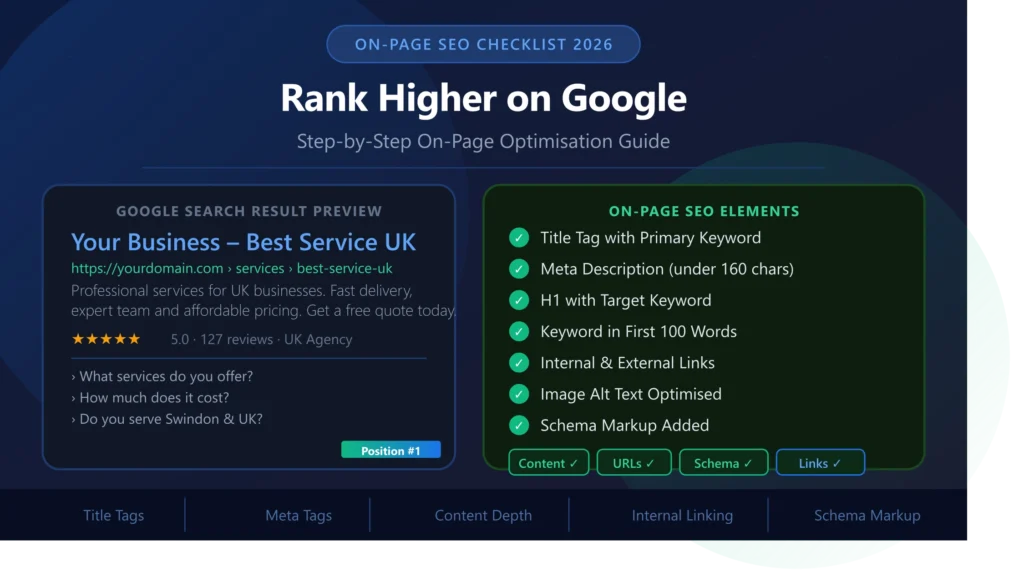
On-Page SEO Checklist 2026:
Step-by-Step Guide to Rank Higher on Google
Who this guide is for: Business owners, marketers, and website managers across the UK and USA who want to improve their Google rankings by optimising the content and structure of their web pages. This checklist covers every on-page SEO element Google evaluates in 2026 — with specific, actionable steps for each. No vague advice — just clear instructions that produce real ranking improvements.
- What is On-Page SEO and Why Does It Matter?
- On-Page SEO vs Technical SEO vs Off-Page SEO
- Step 1: Keyword Research — Foundation of Everything
- Step 2: Title Tag Optimisation
- Step 3: Meta Description Optimisation
- Step 4: URL Structure
- Step 5: Heading Structure (H1, H2, H3)
- Step 6: Content Quality & Depth
- Step 7: Keyword Placement & Density
- Step 8: Internal Linking Strategy
- Step 9: External Links & Citations
- Step 10: Image Optimisation for SEO
- Step 11: Schema Markup & Structured Data
- Step 12: User Experience Signals
- Step 13: E-E-A-T — Experience, Expertise, Authority, Trust
- Step 14: Content Freshness & Updates
- Step 15: Optimising for Featured Snippets
- Step 16: Local On-Page SEO (UK & USA)
- Best On-Page SEO Tools 2026
- Complete Checklist Summary
- Frequently Asked Questions
What is On-Page SEO and Why Does It Matter?
On-page SEO (also called on-site SEO) is the practice of optimising individual web pages to rank higher and attract more relevant traffic from search engines. Unlike off-page SEO — which focuses on building authority through backlinks from external websites — on-page SEO is entirely within your control. Every change you make directly and immediately affects how Google evaluates and ranks your pages.
On-page SEO encompasses everything visible on a page (content, headings, images) as well as elements in the page’s code that users do not see but that search engines read closely (title tags, meta descriptions, schema markup, canonical tags). Getting these elements right is the foundation upon which all other SEO activity builds — without solid on-page optimisation, even the best backlink profile will underperform.
In 2026, Google’s algorithm has become significantly more sophisticated in evaluating on-page quality. It goes far beyond simply counting keyword occurrences — it assesses content depth and expertise, entity relationships, topical authority, user experience signals, and E-E-A-T (Experience, Expertise, Authoritativeness, Trustworthiness). This means on-page SEO in 2026 requires genuine quality and depth, not keyword stuffing or templated content.
The on-page SEO opportunity: For most UK and USA small businesses, on-page optimisation represents the fastest path to better Google rankings — because most competitors have not done it properly. Correctly optimising your title tags, headings, and content often produces ranking improvements within 2–8 weeks, significantly faster than link-building campaigns which can take 3–6 months to show results.
On-Page SEO vs Technical SEO vs Off-Page SEO
Understanding how on-page SEO fits within the broader SEO landscape helps you prioritise effectively. All three types work together — but they address different aspects of how Google evaluates your site.
| SEO Type | What It Covers | Who Controls It | Speed of Results |
|---|---|---|---|
| On-Page SEO | Content, title tags, headings, keywords, images, internal links, schema | You — 100% | 2–8 weeks |
| Technical SEO | Site speed, crawlability, indexing, Core Web Vitals, HTTPS | You + developer | 2–6 weeks |
| Off-Page SEO | Backlinks, brand mentions, social signals, Google Business Profile | Influenced, not controlled | 3–12 months |
Recommended order: Fix technical SEO issues first (so Google can properly crawl and index your pages), then optimise on-page elements (so each page targets the right keywords with quality content), then build backlinks (to increase the authority of your well-optimised pages). Doing it in the reverse order wastes link equity on pages that are not properly optimised to convert that authority into rankings. Read our Technical SEO Checklist 2026 to handle that step first.
Step 1: Keyword Research — The Foundation of Everything
Every on-page SEO optimisation begins with understanding which keywords your target audience actually uses when searching for your products or services. Optimising a page for the wrong keyword — one that is too competitive, too vague, or does not match what your page delivers — wastes your time and produces no ranking results. Keyword research done properly before writing or optimising any content is what separates effective SEO from ineffective busywork.
Understanding Search Intent — The Most Important Concept in 2026 SEO
Google’s primary goal is to match each search query with the page that best satisfies the searcher’s intent. Search intent falls into four categories:
- Informational intent — the user wants to learn something. Example: “what is technical SEO” or “how to improve website speed.” Best content type: blog posts, guides, how-to articles.
- Navigational intent — the user wants to find a specific website or page. Example: “TeamsFreelancer contact” or “WordPress login.” Best content type: homepage, brand pages.
- Commercial investigation intent — the user is researching before buying. Example: “best web development agency UK” or “WordPress vs custom website.” Best content type: comparison articles, reviews, case studies.
- Transactional intent — the user is ready to take action. Example: “hire web developer Swindon” or “buy SEO services UK.” Best content type: service pages, product pages, landing pages with clear CTAs.
Matching your content format and depth to the search intent is critical. A service page written like a blog post will not rank for transactional terms. A blog post written like a sales page will not rank for informational terms. Google analyses the top-ranking pages for each query and rewards pages that match the content format, depth, and angle that users expect.
How to Find the Right Keywords
For UK and USA businesses, keyword research should focus on finding terms with realistic ranking potential — not just high search volume. A keyword with 1,000 monthly searches in the UK that you can reach page 1 for is worth infinitely more than a keyword with 50,000 monthly searches dominated by Wikipedia, BBC, and major brand websites that will take years and a significant budget to compete with.
- Identify 1 primary keyword per page — this is the main term you want the page to rank for; every other on-page element is optimised around it
- Identify 3–5 secondary keywords per page — related terms, synonyms, and long-tail variations that naturally support the primary keyword
- Check search intent before writing — Google “your keyword” and analyse the top 5 results: what format are they? How long? What angle do they take?
- Target location-specific keywords — for UK businesses, include location modifiers: “web development agency Swindon,” “SEO services UK,” “IT company Wiltshire”
- Check Google Search Console — your GSC already shows which queries bring impressions; optimise pages for terms they already rank 5–20 for to push them to page 1
Step 3: Meta Description Optimisation
Meta descriptions are the short paragraph of text that appears below your title in Google’s search results. While Google has confirmed that meta descriptions are not a direct ranking factor — they do not affect where you rank — they are a crucial click-through rate factor. A compelling, well-written meta description that speaks directly to the searcher’s intent can significantly increase the percentage of people who click your result over a competitor’s.
Google rewrites meta descriptions approximately 62% of the time (according to a study by Portent), particularly when the existing description does not closely match the searcher’s query. However, having a well-written meta description still matters — Google will use it when it is relevant, and a poor or missing description means Google will pull random text from your page, which is often poorly suited as a marketing message.
Meta Description Best Practices
- Length: Keep meta descriptions between 140–160 characters. Google typically displays around 155 characters on desktop and slightly fewer on mobile. Descriptions significantly longer than this are truncated mid-sentence.
- Include primary keyword: Google bolds the search query words when they appear in your meta description, making your result more visually prominent in search results.
- Include a clear call to action: End with an action phrase — “Get a free quote today,” “Read the full guide,” “Start your free trial.” This directly improves click-through rate.
- Match the page content: Do not use a meta description that oversells or misrepresents the page. Misleading descriptions increase bounce rate — a negative user experience signal.
- Every page gets a unique description: Duplicate meta descriptions across your site are a missed opportunity and a signal of poor quality to Google.
- Write a unique meta description for every page — check for missing or duplicate descriptions in Google Search Console or Screaming Frog
- Keep between 140–160 characters — use a character counter or SERP preview tool to verify length
- Include the primary keyword naturally — Google bolds matching words in search results, increasing visual prominence
- End with a clear call to action — “Get a free quote,” “Read the guide,” “Book a free consultation”
- Mention your location for local pages — “for businesses in Swindon, UK & USA” increases relevance for local searches
Step 4: URL Structure
Your URL is a minor but confirmed ranking signal. More importantly, a clean, descriptive URL improves click-through rate from search results (users see the URL and can infer what the page is about before clicking), makes your pages more shareable, and helps Google understand the page’s topic and position in your site’s hierarchy.
URL Best Practices
- Include your target keyword: The primary keyword should appear in the URL slug, using hyphens to separate words.
- Keep it short and descriptive: Aim for 3–5 words in the slug. Shorter URLs are easier to share, easier to remember, and slightly preferred by Google.
- Use lowercase letters only: Uppercase letters in URLs can cause duplicate content issues on case-sensitive servers.
- Use hyphens, not underscores: Google treats hyphens as word separators; underscores join words together, making “web_development” read as one word rather than two.
- Remove stop words: Words like “a,” “and,” “the,” “for,” and “of” can usually be removed from URL slugs without affecting readability or SEO.
- Never change a live URL without a redirect: Changing a URL that already has backlinks or rankings without implementing a 301 redirect destroys that page’s ranking history.
Step 5: Heading Structure (H1, H2, H3)
Headings (H1 through H6) serve two purposes in on-page SEO: they help users scan and navigate your content, and they signal to Google the topical structure and relative importance of different sections of your page. Getting headings right is straightforward but frequently done incorrectly, particularly on WordPress sites where themes sometimes apply heading styles without regard for their semantic SEO value.
H1 Tag — The Page’s Main Topic
Every page must have exactly one H1 tag. The H1 is the most important heading on the page and should clearly state what the page is about, including your primary keyword. Unlike the title tag (which is primarily for search results), the H1 is what visitors read first after clicking through. It should be compelling, keyword-inclusive, and immediately confirm to the visitor that they have landed on the right page.
The H1 and title tag should be closely related but do not need to be identical. The title tag has strict length constraints (60 characters) and must work as a standalone marketing message in search results. The H1 can be slightly longer and more descriptive, with the benefit of being read in the context of the page’s design and imagery.
H2 Tags — Section Headers
H2 tags should be used for the main sections of your content. They are a significant on-page SEO signal — Google uses them to understand the content’s structure and the subtopics covered. Each H2 should ideally include a secondary keyword or a related term that supports the page’s primary topic. Think of H2s as the chapter headings of your page’s content.
H3–H6 Tags — Subsection Structure
H3 through H6 tags create hierarchical structure within H2 sections. H3s are subsections of H2s; H4s are subsections of H3s, and so on. For most web pages, you will rarely need to go beyond H3. Never skip heading levels (jumping from H2 directly to H4) as this breaks the semantic hierarchy that helps both users and search engines parse your content.
- One H1 per page only — includes primary keyword; clearly states what the page is about
- H1 is different from the title tag — related but not identical; can be slightly longer and more descriptive
- Use H2 for all major sections — include secondary keywords naturally in H2 headings
- Never skip heading levels — always maintain H1 > H2 > H3 > H4 hierarchy
- Make headings descriptive — avoid vague headings like “Introduction” or “More Information”; be specific about what each section covers
- Check for missing H1s — use Screaming Frog to audit your entire site for pages missing H1 tags or with multiple H1s
Step 6: Content Quality & Depth
Content quality is the single most important on-page SEO factor in 2026. Google’s algorithms — particularly the Helpful Content system introduced in 2022 and significantly strengthened in 2023 and 2024 — are specifically designed to reward content that genuinely helps users and penalise content that exists primarily to rank rather than to inform or assist.
This means thin content (short pages that cover a topic superficially), generic content (the same advice found on thousands of other websites), and AI-generated content without genuine expert input or original insight are all increasingly disadvantaged in Google’s rankings. The bar for what Google considers “high quality” rises every year, and in 2026 it is meaningfully higher than it was even in 2023.
What Google’s Helpful Content System Looks For
Google’s guidance on helpful content asks a series of questions about whether a piece of content was created for people or for search engines. Content that passes these tests tends to rank; content that fails tends to be demoted. The key questions include: Does the content provide original information, reporting, research, or analysis? Does it provide a substantial, complete answer to the question? Would a reader leave satisfied, or would they need to go elsewhere to get the full answer? Is the content written from genuine expertise and experience?
Content Length — Quality Over Quantity
There is no universal “correct” length for SEO content. The right length is whatever it takes to comprehensively answer the searcher’s query. For a transactional query like “web development agency Swindon,” a service page of 800–1,200 words is appropriate. For an informational guide like this one, 3,000–5,000 words may be needed to cover the topic with sufficient depth to genuinely satisfy the searcher and demonstrate expertise.
Research by Backlinko consistently finds that longer content tends to rank higher on Google — not because of length itself, but because comprehensive content signals expertise and covers the topic in the depth that satisfies searcher intent. However, padding content with unnecessary repetition or filler phrases to inflate word count is counterproductive and detected by Google’s quality systems.
- Write content that fully answers the searcher’s question — cover the topic comprehensively, including subtopics competitors cover that you might miss
- Include original insights, data, or expertise — cite real statistics, share genuine experience, or provide analysis unavailable elsewhere
- Match content depth to search intent — informational guides need depth; transactional service pages need clarity and conversion focus
- Break up content for readability — use headings, bullet points, tables, images, and callout boxes to make long content scannable
- Update content regularly — stale content loses rankings over time; add new information, update statistics, and mark the published date as updated
- Aim for a reading level appropriate to your audience — technical topics may require technical language; business topics should be clear and jargon-free
- Eliminate thin sections — if a section only has 2–3 sentences and adds little value, either expand it significantly or remove it
Step 7: Keyword Placement & Density
In the early days of SEO, ranking was largely about repeating your target keyword as many times as possible — a practice called keyword stuffing. Google’s algorithms have evolved dramatically since then, and in 2026 keyword stuffing is not only ineffective but actively harmful to rankings. Google now penalises pages that repeat keywords unnaturally and rewards pages that cover topics comprehensively using natural language.
Modern on-page keyword optimisation is about strategic placement of your primary keyword in the most important positions on the page, while using semantically related terms (LSI keywords), synonyms, and topic-covering language throughout the rest of the content. This signals topical expertise more effectively than repetitive keyword use.
Where Your Primary Keyword Should Appear
| Element | Keyword Placement | Priority |
|---|---|---|
| Title Tag | Include primary keyword, ideally near the beginning | Critical |
| H1 Tag | Include primary keyword naturally | Critical |
| First 100 words | Use primary keyword in the opening paragraph | High |
| URL slug | Include primary keyword in the URL | High |
| Meta description | Include primary keyword (for bold matching in SERPs) | Medium |
| H2/H3 headings | Use primary + secondary keywords across section headings | Medium |
| Image alt text | Include keyword in at least one image alt text naturally | Medium |
| Body content | Use keyword naturally 3–5 times per 1,000 words; no more | Medium |
| Last paragraph | Include keyword or a close variant near the end of the content | Low-medium |
Keyword density guidance: Aim for a natural keyword density of approximately 1–2% (roughly 1–2 uses per 100 words). If you are writing naturally and covering the topic thoroughly, you will hit this range organically. If you have to force your keyword into sentences where it reads awkwardly, you are keyword stuffing — stop, rephrase, and use a natural synonym or related term instead.
Step 8: Internal Linking Strategy
Internal linking — linking from one page on your website to another — is one of the most underutilised on-page SEO techniques, particularly for UK small business websites. Done well, internal linking achieves three critical goals simultaneously: it helps Google discover and crawl all your pages, it distributes link equity (ranking power) across your site, and it keeps visitors engaged by guiding them to relevant content.
Google’s PageRank algorithm — which underpins how it evaluates page authority — flows through links. External backlinks bring PageRank into your site from outside. Internal links then distribute that PageRank across your pages. Pages that receive many internal links are treated as more important and tend to rank better, all else being equal. This gives you direct control over which pages Google treats as most authoritative within your site.
Internal Linking Best Practices
The most important internal linking principle is to use descriptive anchor text — the clickable text of the link. Avoid generic anchor text like “click here” or “read more.” Instead, use text that describes the destination page, including relevant keywords. For example, linking to your SEO services page using the anchor text “SEO optimization services” is significantly more valuable than “click here to learn more.”
Every new piece of content you publish should link to at least 3–5 relevant existing pages on your site — and those existing pages should be updated to link back to the new content where relevant. This bidirectional linking creates a strong internal link network that maximises the PageRank distribution across your entire site.
- Add 3–5 internal links to every new page — link to the most relevant existing pages using descriptive anchor text
- Update existing pages to link to new content — bidirectional internal linking maximises equity distribution
- Use descriptive anchor text always — never “click here”; always use keyword-rich descriptions of the destination
- Link to your most important pages frequently — service pages and cornerstone content should receive the most internal links
- Fix orphan pages — every page should have at least one internal link pointing to it; pages with zero internal links receive no PageRank distribution
- Link to deep pages, not just the homepage — many sites over-link to their homepage; distribute internal links to service pages and blog posts
Step 9: External Links & Citations
Linking out to other websites — external linking — is a small but meaningful on-page SEO signal. Many website owners avoid external links out of a misguided fear of “sending visitors away.” In reality, linking to high-quality, authoritative external sources signals to Google that your content is well-researched and connects meaningfully to the broader web of information on your topic.
Google’s own patents and public statements make clear that pages that cite credible sources are evaluated as more trustworthy than pages that make claims without any supporting references. For content on topics that require evidence-based claims — such as statistics, health advice, legal information, or financial guidance — external citations to authoritative sources like government websites, peer-reviewed research, or major industry publications are particularly valuable.
- Link to 2–4 authoritative external sources per page — government sites (.gov.uk, .gov), established publications, or academic sources
- Open external links in a new tab — add target=”_blank” to prevent visitors from navigating away from your page
- Add rel=”nofollow” to sponsored links — any paid or sponsored link must have nofollow or sponsored rel attribute per Google’s guidelines
- Avoid linking to competitors — link to non-competing authoritative sources, not direct competitors
- Check external links regularly — external pages can disappear or change; broken outbound links are a quality signal issue
Step 10: Image Optimisation for SEO
Images are both an on-page SEO opportunity and — if poorly handled — a significant ranking liability. Every image on your page is an opportunity to provide additional keyword signals through file names and alt text, while also contributing to a faster or slower page load that directly affects your Core Web Vitals scores. Getting image optimisation right means addressing both dimensions.
Alt Text — The Most Important Image SEO Element
Alt text (alternative text) is HTML attribute text that describes an image. It serves two purposes: it is read by screen readers for visually impaired users (making it essential for accessibility compliance), and it tells Google what an image depicts (since Google cannot directly see images the way humans do). Alt text is a meaningful keyword signal — images with relevant, descriptive alt text contribute to a page’s topical relevance for its target keywords.
Alt text should be descriptive and specific, naturally incorporating relevant keywords where they genuinely apply to the image content. Do not keyword stuff alt text — “web development UK web design website development Swindon” as alt text is spam. Instead, describe the image accurately: “TeamsFreelancer team working on a custom web development project in Swindon.”
- Write descriptive alt text for every image — describe what the image shows, including relevant keywords where they naturally apply
- Use descriptive file names — rename images before upload: “swindon-web-development-agency.webp” not “IMG_4532.jpg”
- Compress all images — target under 100KB per image; use WebP format for best compression-to-quality ratio
- Specify width and height attributes — prevents Cumulative Layout Shift (CLS) which affects Core Web Vitals score
- Use relevant images that add value — stock photos of generic business people add no SEO value; use real team photos, project screenshots, or instructional diagrams
- Add image captions for important images — captions are read by both users and Google; they provide another opportunity to reinforce topical relevance
Step 11: Schema Markup & Structured Data
Schema markup is code added to your page’s HTML that speaks directly to search engines in a structured, unambiguous format — describing what your content is (an article, a service, a business, an FAQ) in a way that makes it easier for Google to understand and potentially display as rich snippets in search results.
Rich snippets — enhanced search result listings showing star ratings, FAQ answers, event dates, or how-to steps — attract significantly more clicks than standard results. Studies show rich snippets can improve click-through rate by 20–30% for the same ranking position. Implementing schema markup is one of the highest-ROI on-page SEO activities available, particularly since many competitors neglect it.
Essential Schema Types for UK & USA Business Websites
- Article / BlogPosting — for blog posts and guides; enables publication date, author, and featured image in search results
- FAQPage — for pages with FAQ sections; enables expandable FAQ answers directly in search results, dramatically increasing SERP real estate
- LocalBusiness / Organization — for business pages; enables Knowledge Panel information, operating hours, and contact details
- Service — for service pages; helps Google understand your specific service offerings and service area
- BreadcrumbList — for all pages with breadcrumb navigation; shows the breadcrumb path in search results below the title
- Review / AggregateRating — for pages with testimonials; enables star ratings visible in search results
Quick win for UK businesses: Adding FAQPage schema to your service pages is one of the fastest ways to increase your search result visibility. Once Google displays your FAQ rich snippet, your single listing can take up 3–4 times more space on the search results page — pushing competitor results further down even if you do not change your actual ranking position.
- Add Article schema to all blog posts — include author, datePublished, dateModified, and image properties
- Add FAQPage schema to every FAQ section — instant rich snippet potential in Google search results
- Add LocalBusiness schema to homepage/contact page — includes address, phone, opening hours, and service area for Swindon and UK
- Validate all schema — test at search.google.com/test/rich-results before publishing
- Monitor rich snippet performance in GSC — Google Search Console shows which rich snippets are being displayed and their click data
Step 12: User Experience Signals
Google’s algorithm increasingly incorporates user experience signals — behavioural data from how real Chrome users interact with pages — into its ranking calculations. While Google has never officially confirmed specific UX metrics as direct ranking signals, the correlation between positive user experience and high rankings is undeniable, and the introduction of Core Web Vitals as explicit ranking factors confirms that page experience matters significantly.
The key UX signals believed to influence rankings include bounce rate (users clicking back to Google immediately after landing on your page, signalling dissatisfaction), dwell time (how long a user stays on your page before returning to search results), and pogo-sticking (repeatedly clicking through results and back until finding a satisfying answer). Pages that consistently satisfy users rank higher over time; pages that repeatedly disappoint searchers gradually lose rankings.
- Deliver on your title tag’s promise immediately — the opening paragraph should confirm the visitor has found what they searched for
- Make content scannable — use headings, bullet points, short paragraphs, and visual elements to help users quickly find what they need
- Eliminate intrusive pop-ups — especially on mobile; Google penalises pages with intrusive interstitials that obstruct content
- Ensure every page has a clear next step — every page should have a logical CTA appropriate to the visitor’s position in the buying journey
- Pass Core Web Vitals — LCP under 2.5s, INP under 200ms, CLS under 0.1; check in Google Search Console
- Ensure text is readable — minimum 16px body font size, high contrast between text and background, sufficient line spacing
Step 13: E-E-A-T — Experience, Expertise, Authoritativeness, Trust
E-E-A-T (Experience, Expertise, Authoritativeness, Trustworthiness) is Google’s framework for evaluating the quality and credibility of web content. Introduced in Google’s Search Quality Rater Guidelines and significantly expanded in 2022 to add the second “E” for Experience, E-E-A-T is now one of the most important concepts in on-page SEO — particularly for content on topics that could significantly impact someone’s health, finances, safety, or major life decisions (which Google calls “Your Money or Your Life” or YMYL topics).
While E-E-A-T is not directly measurable as a ranking signal, Google’s quality raters use it to evaluate pages, and the algorithm is trained to reward pages that demonstrate these qualities. For UK and USA business websites, demonstrating E-E-A-T means providing evidence that your content is written by genuine experts with real experience.
How to Demonstrate E-E-A-T on Your Website
- Experience: Include first-hand accounts, case studies, real project examples, and specific details that demonstrate you have actually done what you are describing. Generic advice without real-world grounding scores poorly on experience.
- Expertise: Author bios that include credentials, qualifications, and relevant professional background. Blog posts attributed to named individuals with demonstrated expertise rather than “admin” or “webmaster.”
- Authoritativeness: Backlinks from reputable industry sources, mentions in credible publications, client testimonials with real names and companies, case studies with verifiable results.
- Trustworthiness: Clear contact information, physical address (Swindon office address builds local trust), privacy policy, terms of service, SSL certificate, transparent pricing, and real team photos.
- Add author bios to all blog posts — include name, photo, credentials, and relevant experience
- Create a detailed About page — team photos, years in business, specific expertise, and company story
- Display your physical address prominently — Empire Court, Clarence St, Swindon SN1 2JF builds local trust
- Add real client testimonials with names — anonymous reviews carry far less trust than named, verified testimonials
- Link to your Google Business Profile reviews — verified Google reviews are among the strongest trust signals for UK businesses
- Include case studies with real results — specific metrics and client names (with permission) demonstrate genuine expertise
Step 14: Content Freshness & Updates
Google’s “Query Deserves Freshness” (QDF) algorithm gives a ranking boost to recently updated content for topics where recency matters — including news, current events, product launches, and changing best practices like SEO. For a topic like “on-page SEO checklist 2026,” the year in the title and the recency of the content are ranking signals.
More broadly, content that has not been updated in 2–3 years gradually loses rankings as fresher, more current content from competitors overtakes it. For informational content that covers topics where best practices evolve (SEO, web development, digital marketing, technology), a quarterly content review and update schedule is ideal.
- Update the dateModified in schema markup — when you update content, update the published/modified dates in both the visible content and schema markup
- Add current year to time-sensitive content — “Technical SEO Checklist 2026” ranks better than “Technical SEO Checklist” for current-year searches
- Review and update statistics annually — outdated statistics damage credibility; refresh data points from authoritative sources each year
- Add new sections as topics evolve — add new subsections covering developments in the field rather than starting from scratch
- Submit updated URLs for recrawling in GSC — after significant updates, request recrawling in Google Search Console to speed up re-indexing
Step 15: Optimising for Featured Snippets
Featured snippets are the boxed answers that appear above all organic results at the top of Google’s search page — often called “position zero.” They are selected by Google from pages that rank on page 1 and are judged to directly and concisely answer the searcher’s query. Earning a featured snippet for a competitive keyword can double or triple your click-through rate for that term.
The most common types of featured snippets are: paragraph snippets (a 40–60 word answer to a question), list snippets (a numbered or bulleted list of steps or items), and table snippets (a comparison or data table). Understanding which type applies to your target keyword (check what snippet format currently appears for that query in Google, if any) tells you how to format your content to compete for it.
How to Optimise for Featured Snippets
- Target question-format queries: Featured snippets most commonly appear for “how,” “what,” “why,” and “which” queries. Identify question keywords your pages could answer.
- Provide a direct, concise answer early: For paragraph snippets, place a clear 40–60 word answer to the target question immediately after the H2 heading that asks the question.
- Use numbered lists for processes: For “how to” queries, structured numbered lists with clear step headings are the most likely format to earn a list snippet.
- Use tables for comparisons: Data formatted in HTML tables is most likely to earn table snippets for “versus” and “comparison” queries.
Featured snippet tip: You can only earn a featured snippet from a page that already ranks on page 1. Focus on featured snippet optimisation only for keywords where you already rank positions 1–10. The format of your content — not the keyword density — is what earns the snippet.
Step 16: Local On-Page SEO for UK & USA Businesses
For businesses with a physical location or those targeting customers in specific cities or regions — like TeamsFreelancer serving Swindon, Wiltshire, and across the UK — local on-page SEO adds an additional layer of optimisation that significantly affects local search rankings and Google Maps visibility.
Local on-page SEO goes beyond simply mentioning your city name in content. It involves creating dedicated location pages for each major geographic area you serve, embedding your business name, address, and phone number (NAP) consistently across your site, and structuring your content to match the specific search behaviour of local customers who often include location qualifiers in their queries.
- Include location in title tags and H1s of service pages — “Web Development Services Swindon UK” instead of just “Web Development Services”
- Mention your service area naturally in content — reference Swindon, Wiltshire, South West UK, and other target areas throughout page content
- Consistent NAP across site — Name, Address, Phone must be identical across every page footer, contact page, and schema markup
- Add LocalBusiness schema to homepage — includes your physical address, service area, and contact information in structured data
- Embed a Google Map on your contact page — confirms physical location to Google and improves local ranking signals
- Create service area pages — dedicated pages for each city or region you serve (e.g., /seo-services-swindon/, /web-development-bristol/)
- Link to your Google Business Profile — cross-link between your website and your verified GBP listing
Best On-Page SEO Tools in 2026
These are the tools we use and recommend for on-page SEO auditing and optimisation for UK and USA business websites:
Complete On-Page SEO Checklist Summary
Use this quick-reference checklist to verify every on-page SEO element on your most important pages:
Want Us to Handle Your On-Page SEO?
TeamsFreelancer provides professional on-page SEO services for businesses across the UK, Swindon, and the USA. We audit every element, implement fixes, and report on ranking improvements — with transparent pricing and no long-term contracts.
Get Your Free SEO Audit Today